Configure Default ContentMetadata
Introduction
This guide explains how to enable and configure the list of default content metadata for attribute. When an attribute is created, the content metadata will also be created automatically following the configuration file.
Prerequisites
- Attribute Set collection entities are properly configured. There is at least one content metadata entity in this collection.
- Full access permissions for Attribute Set are granted.
- The Data Management service is installed and running.
Step-by-step setup instructions
- Create the configuration file:
- The mapped name of the file is:
com.priint.datamanagement.config.DataManagementPlugin. - The sample content for configuration file:
<?xml version="1.0" encoding="UTF-8" standalone="yes"?>
<con:PluginConfig xmlns:con="com.priint.pubserver.config.manager/20130620">
  <con:name>attributeContentMetaData.xml</con:name>
  <con:type>AttributeContentMetaData</con:type>
  <con:description>Attribute ContentMetaData Configuration</con:description>
  <con:dependencies/>
  <con:custom>
    <attributeContentMetaDatas>
      <attributeContentMetaData>
        <entityIdentifier>attribute_display</entityIdentifier>
        <key>Display_Default</key>
        <value>Attribute Name + Display</value>
      </attributeContentMetaData>
      <attributeContentMetaData attributeName="Product">
        <entityIdentifier>attribute_display</entityIdentifier>
        <key>Display_Product</key>
        <value>Attribute</value>
      </attributeContentMetaData>
      <attributeContentMetaData attributeName="Category">
        <entityIdentifier>attribute_display</entityIdentifier>
        <key>Display_Category</key>
        <value>Attribute Wert</value>
      </attributeContentMetaData>
    </attributeContentMetaDatas>
  </con:custom>
  <con:instances/>
</con:PluginConfig>
Explains:
<attributeContentMetaDatas>: The list of content metadata.<attributeContentMetaData>: Detail information of a configured content metadata. The propertyattributeNamemeans that if the name of the attribute is exactly the same as it, then the content metadata will be added.attributeName: the label of the attribute. The list of default content metadata is depended on this label.<entityIdentifier>: The entity identifier of the content metadata entity.key: Key of the content metadata when it is created.value: Value of the content metadata when it is created.
- The folder structure should be as shown in the picture below:

Note: the 2nd folder level is the name of your tenant. So that it can be another name. Such as: WerkII, Priint, ect.
- Validate the configuration
- After configuring, we can do some testing to make sure that the configuration file is working or not.
- For example, follow the above sample file, there are three possible cases:
Case 1. The definition of attribute is Product, then we will have 2 content metadata as default after creation a new attribute:
| Key | Value |
|---|---|
| Display_Default | Attribute Name + Display |
| Display_Product | Attribute |
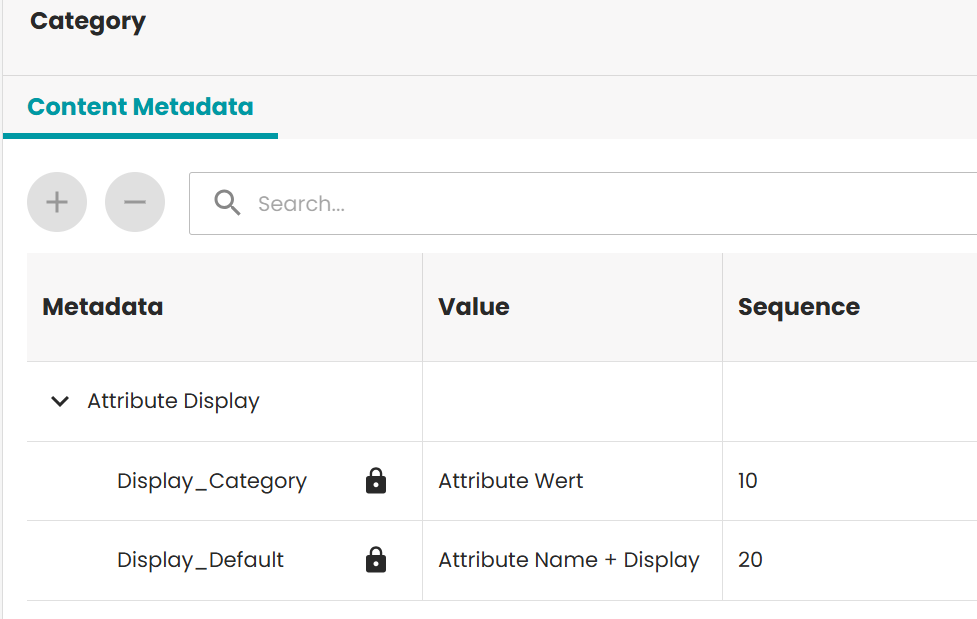
Case 2. The definition of attribute is Category, then the list of content metadata will be:
| Key | Value |
|---|---|
| Display_Default | Attribute Name + Display |
| Display_Category | Attribute Wert |
Case 3. If we put a random label for the definition, then the list of default content metadata will be as below:
| Key | Value |
|---|---|
| Display_Default | Attribute Name + Display |
Below is how it shows in the UI: