Required Data Structure
Overview
This article explain how the data management uses the three separate concepts source data, structure information and VR Model.
Facets do not alter your data. They only describe how to present it. You combine filters, groups, and searches to build a structure that matches the logic of your project. We use this output to model our publishing products, by selecting facet hierarchies in our documents we can structure our publications and can group products based on criteria defined in the hierachy.
Before we can get started, to understand how the facet work in general read the following introduction: What are Facets?
Introduction
While there are more entities that need to be installed, for now we are focusing on the most important ones to explain the concept of the Facet module in the Data Management application.
To find the complete list of entities check out Activate Facet Module for a detailed listing of all entities and how to get activate the module.
Core Concepts
Let's cover the three separate concepts source data, structure information and VR Model:
Source Data
The source product data is a flat list of products that will provide the basis for building a product tree. By providing list of atomic products at the lowest level with all attributes, we can use the conditions in the structure information to build the product tree in reverse. The individual attribute information will be used to filter and group each article into the resulting VR model.
The information is retrieved using the rest-connector configuration facets.xml.
Structure Information
The facet hierarchy with its facet nodes is the structure to define a data tree based on facets. After creating a new facet hierarchy, the user can start creating the structure that will determine the way the product data is transformed. The user drags and drops filters, groups and classifications into the tree. They are defining the funnel logic, that will be combined with the source data to result in the VR model.
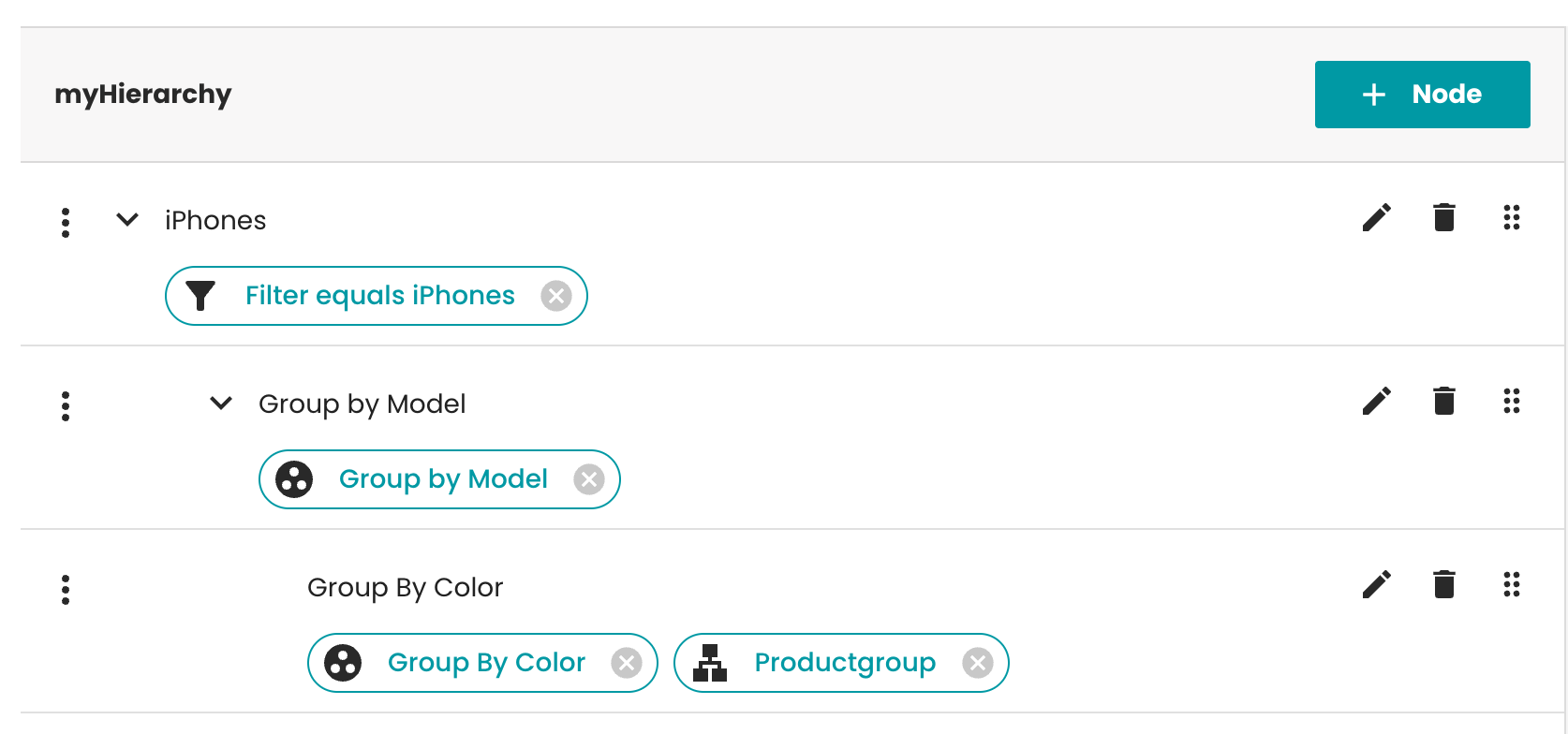 Example facet hierarchy showing filters, groups, and classifications organized in a tree structure
Node
Entity FacetNode - PublishingHubDB
A facet node is the stored record in the PublishingHubDB that represents one leaf in the facet structure. It enables storing the filters in a hierarchical tree view by organising nodes as children.
Filter
Entity FacetFilter - PublishingHubDB
A filter defines a query statement so the system can narrow down the list of results. To find out more about the supported query syntax, check the user guide.
Group
Entity FacetGroup - PublishingHubDB
A group defines a specific attribute that acts as a condition for splitting up the list of products into the unique characteristics of each product. The group will consist of all products that have the specific attribute keys, matching attribute values will result in the products
Classification
Entity Pub_Hierarchy_Node - PublishingHubDB
We call this entity classification, because we usually use the classification to mark certain levels in the hierarchy for downstream systems. When generating the VR Model, you need context about a specific layer in the resulting product tree. For example, you might want to distinguish the product group from the actual product level. This helps teams choose the right layers, for example in their scripts on the publishing server or selecting the right template or Attribute Set based on this classificiation.
To find out more about how to create and use attribute sets read more about it in the dedicated attribute sets module.
VR Model
When the user is done with selecting groups and filters and has defined the target structure, they can now combine the source data with the structure information. In the Datamanagement this is possible by selecting View Data inside of the dialog for creating a hierarchy. In the target system, the users can select the hierarchy they previously created in Data Management and query the VR model for the final data structure.
The system generates the VR Model in two steps:
- Structure evaluation: The facet-core plugin processes your filters and groups to build a query plan
- Data retrieval: Elasticsearch executes this query against your product data and returns the structured result
Users can preview this output by clicking "View Data" in the hierarchy dialog.
The publishing server retrieves the final structure using the vr-facets.xml configuration.
While activating the Facet module, you will note that there's a lot more entities in the entity model, that are not mentioned in this introduction. This is because we are using Links (Cord) to create the connections between the different entities and we are using hierarchies or collections for organising the data. These entities are needed from a technical perspective, but they are not necessary to understand the general functionality. We either talk about hierarchy or collections that help organise the data structure but do not impact the core data transformation.
The transformation is only applied on the actual nodes, filters and groups inside of those structure entities.
The Data Management application supports nested structures only for Collections. This functionality is not available for Hierarchies.
Next Steps
If you are looking for code examples and the skeleton project for getting started with the facets in your publishing server projects, please get in touch with our support. The skeleton project solves some default use-cases like planning product data based on your selected hierarchy and a selected attribute set; and much more.
Now that you understand how facets transform data, let's look at how to structure your Elasticsearch indexes to support this process.
Requirements for the Source Data
Data Management requires Elasticsearch for storing and querying product data. You must provision and configure your own Elasticsearch instance before using the facet module. We don't distribute ElasticSearch as part of our Data Management. For more information, check our installation section or the vendor website.
If you're new to Elasticsearch, understand these concepts first:
- Indexes store collections of similar documents
- Documents are JSON objects representing individual records
- Field types control how data is stored and searched (use 'keyword' for filtering, 'text' for full-text search)
The system needs to be set up with indexes matching the structure described in this guide.
Introduction
Usually in a PIM system the data comes already stored in a hierarchy. There is usually a category tree, where products are assigned to some categories and the products also have skus (or "variants" or "articles") assigned. Each node in this hierarchy also has content assigned to it (like images, text, attributes, etc.).
This kind of hierarchy is not really ideal for usage with our Facet module in ElasticSearch. To use the search engine in an optimal way, the data should be stored in documents without any hierarchy above it. We recommend storing the hierarchy information from the data source because it is also useful for faceting (and rendering in downstream publishing server).
Before the data is imported to Elasticsearch it is necessary to "flatten" the hierarchy.
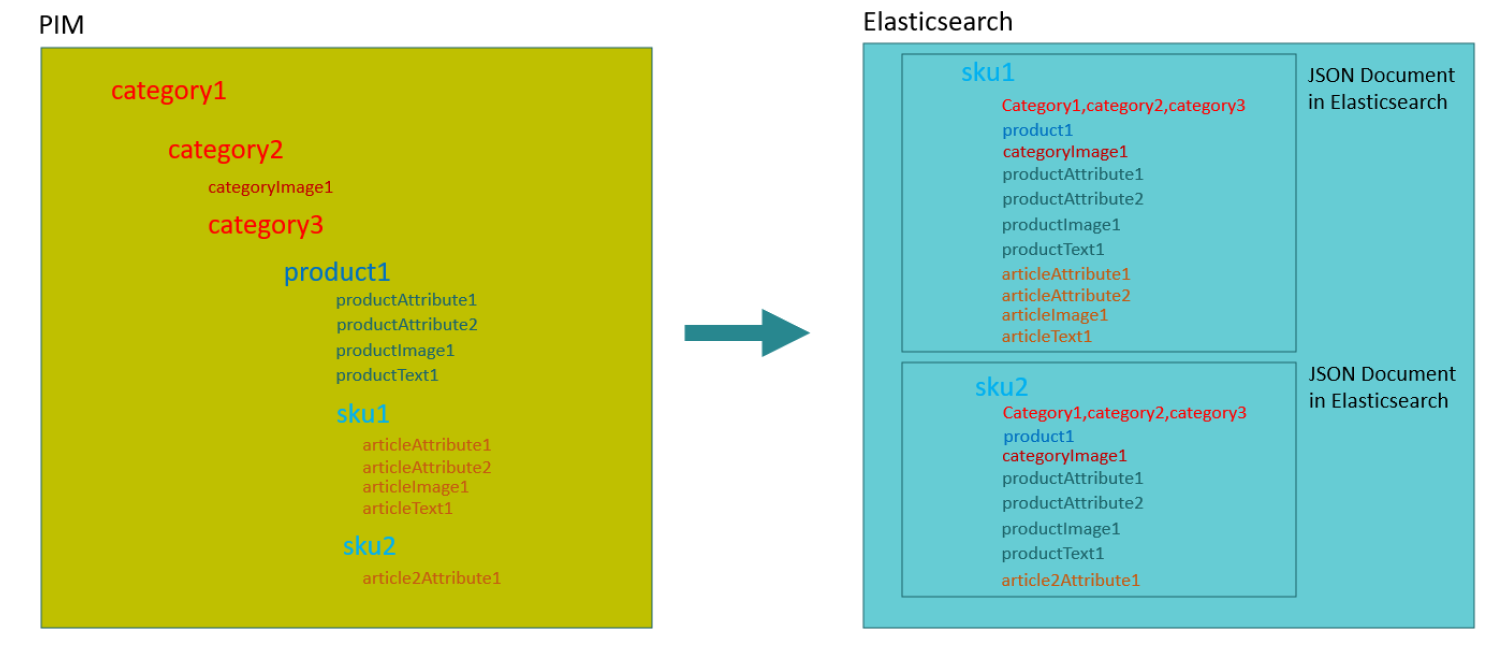 Example of how PIM data is flattened to flat product data
This means, that in Elasticsearch the leaves of the hierarchy tree are stored as a document which can be searched for (in the example above it would be the sku). This document also must include all information about the nodes in the tree above the sku node. So, the document also includes all information about the product (images, attributes, etc.) and the categories the product belongs to.
While using the Data Management as described above the grouping, can now either be built in the exact same way or dynamically based on specific attributes relevant only for the target channel. This makes the approach of using the Data Management much more flexible than the static hierarchy structure in the source system.
This guide explains how to design and organize data structures in Elasticsearch to support Facet Core (faceted navigation, filtering, and aggregations).
A poorly designed schema can lead to slow facet queries, inaccurate counts, or unnecessary index bloat.
Facets vs Aggregations
Facets (legacy term) → replaced by aggregations in modern Elasticsearch.
Field Data Types for Facets
keyword → for exact matches and terms aggregations
string → easy to store and do not care about conversion issue
Index and Document Design
Indexing Strategy
One index per dataset or domain (e.g., priintfacet, priintdata)
Document Structure
Flat fields preferred for facets.
Mapping for Faceted Fields
Keywords for Facet Data
Use keyword for categorical fields
(attributes, price, asset, metadata)
{
  "_type": "_doc",
  "_source": {
    "label": "label 123",
    "attributes": [ {
        "label": "label for attribute",
        "metadata": [ {
            "key": "Identifier",
            "value": ABC_123"
                } ]
          } ]
  }
}
Example
priintfacet.json ⇒ This data is used for facet search.
{
  "_index": "priintfacet",
  "_type": "_doc",
  "_id": "245206@1",
  "_score": 1.0,
  "_source": {
    "identifier": "245206@1",
    "label": "label A",
    "entity": "article",
    "productid": "242180@1",
    "productlabel": "product label",
    "structurepath": "abc:path",
    "Article A": "abc",
    "Group": "Lederhandschuhe",
    "Article group": "A123 90",
    "Article 2": "Millimeter",
    "Article status": "release",
    "Article_extra_text": "false",
    "Product_Planning": "product Axtr"
  }
}
priintdata.json ⇒ This data is used for retrieving the detailed data in elasticsearch.
{
"id": "3681@1",
"label": "Article A",
"key": "Article status",
"value": "release",
"unit": "",
"entity": "article_entity",
"type": "",
"sequence": "0",
"multivalue": "true",
"metadata": [
        {
        "key": "qualification:language",
        "value": "en-GB"
        },
        {
        "key": "datatype:",
        "value": "DECIMAL"
        }
    ]
}