BPMN embedded modeler
1 Introduction
BMPN modeler is a user-friendly modeling tool that gives developers powerful features for designing and deploying automated processes, human workflows and decision requirements diagrams using the globally recognized BPMN. It is written in JavaScript, embeds BPMN diagrams into modern browsers, and requires no server backend. Bpmn-js tools are built and battle tested by Camunda and an integral part of the Camunda product stack. Embedded modeler use library bpmn-js. More information about the library can be found in bpmn-js.
2 Window
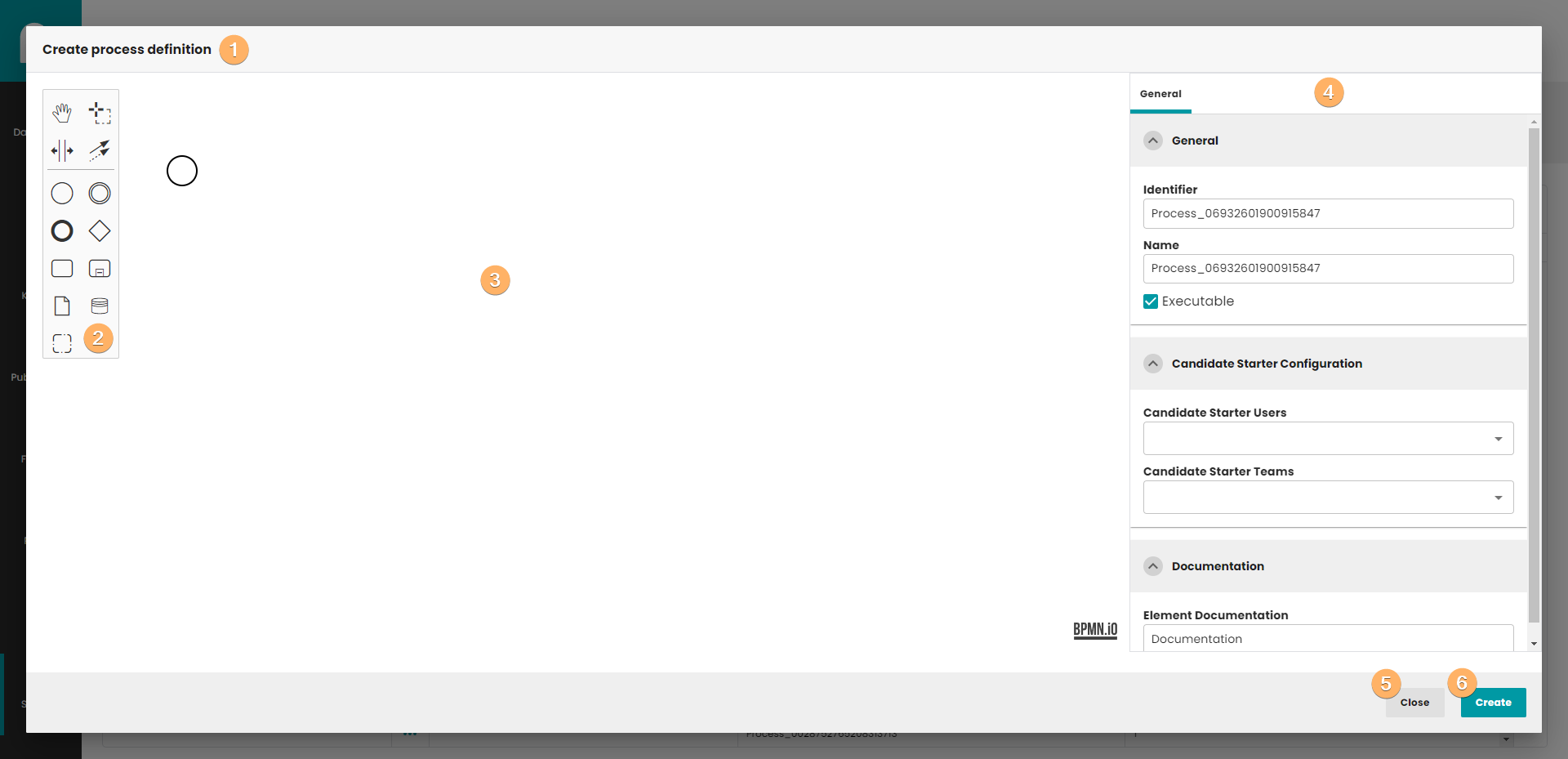
- Window title. When you edit a process, the name of the process that has been selected for editing will appear here.
- Toolbar with all components necessary to create a process and tools for managing dialogue elements.
- Canvas with process definition. You can use When you click on this field, you can edit basic information about process definition.
- Detail panel, when you can find and edit information about process and components.
- Close button. After you click on this button, all information will be lost.
- Create process definition button. When you click on this button, process definition will be saved in database. The process do not need to be finished. If you edit process definition, the Create button is replaced by the Update button. Update button create new version of process definition, so you can easily go back to previous version of process.
3 Process
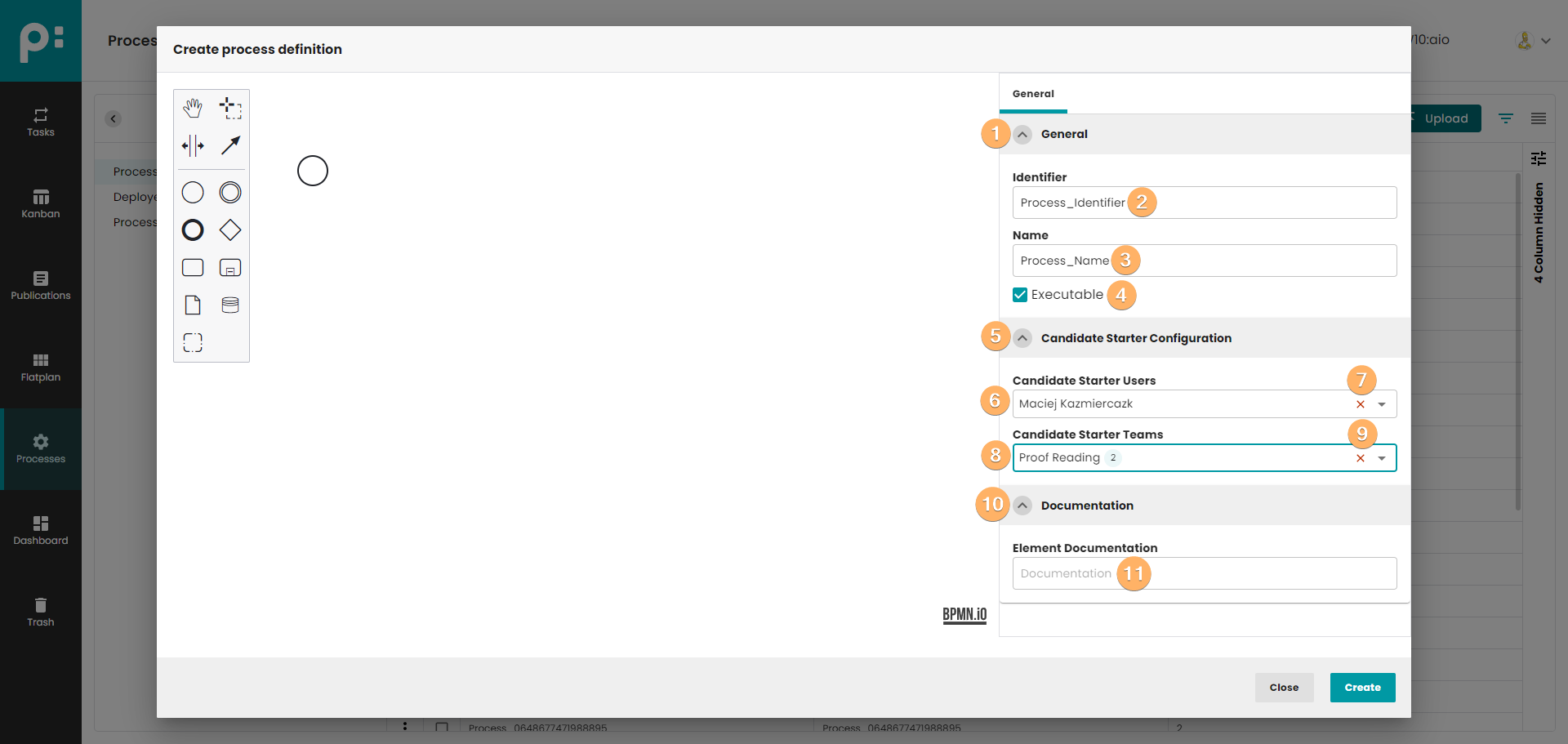
- The accordion component allows showing and hiding sections of related content on a page.
- Process identifier.
- Process name.
- If executable is deselected, then run process will not be possible in Camunda. Default executable is selected.
- The accordion component allows showing and hiding sections of related content on a page.
- You can select users which can start process instance. If no user has been indicated, it means that each user can run the process.
- Button which remove all candidate starter users.
- You can select teams which can start process instance. If no team has been indicated, it means that each user can run the process regardless of what team he is in.
- Button which remove all candidate starter teams.
- The accordion component allows showing and hiding sections of related content on a page.
- Process documentation.
4 Start event
This element is represented by a circle in the diagram. It is used to start the process instance. It contains a number of functionalities that can be set during process startup. Those functionalities can may affect the process fate.
4.1 General
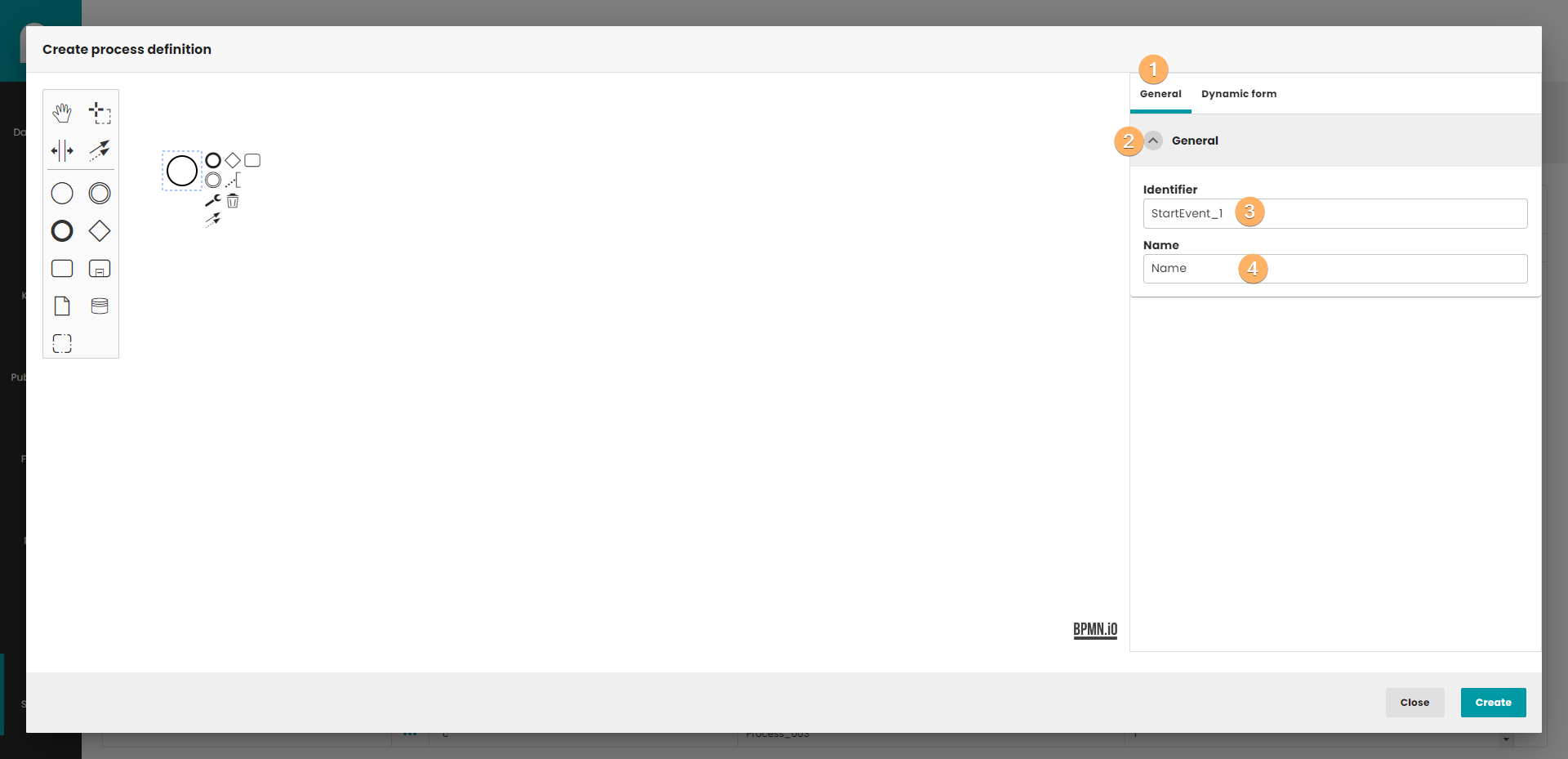
- Tab with basic information.
- The accordion component allows showing and hiding sections of related content on a page.
- Element identifier.
- Element name.
4.2 Dynamic form
A tab with a dynamic form is a place where you create or indicate a ready form that is to be displayed to the user during the process. You can create a form statically by selecting type "form" or dynamically using plugin method name.
4.2.1 Plugin mapped name
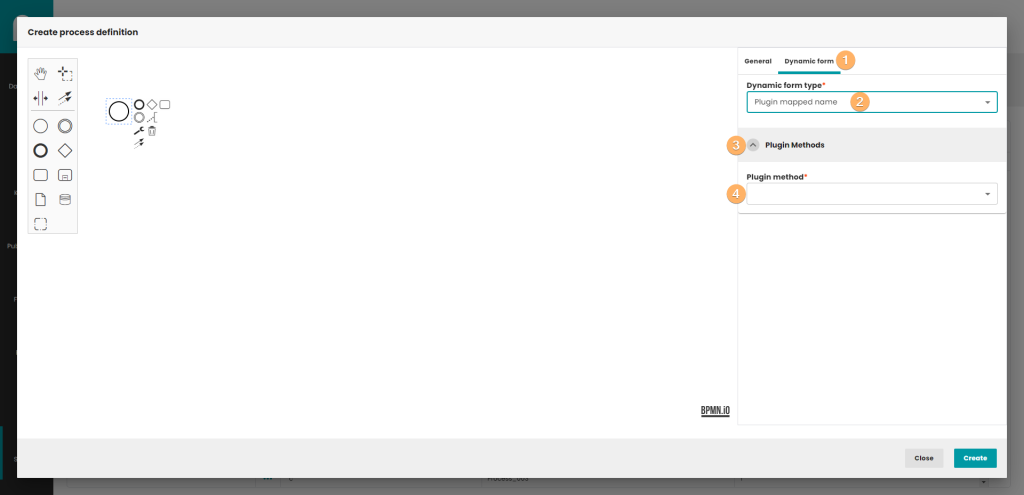
- The tab where you define dynamic GUI for the startup item.
- Dynamic form component with the "Plugin mapped name" option selected. Those option displays a component, where you can indicate your preferred GUI generating method.
- The accordion component allows showing and hiding sections of related content on a page.
- The place to choose the method, that will generate the GUI components when the process is started.
4.2.2 Form
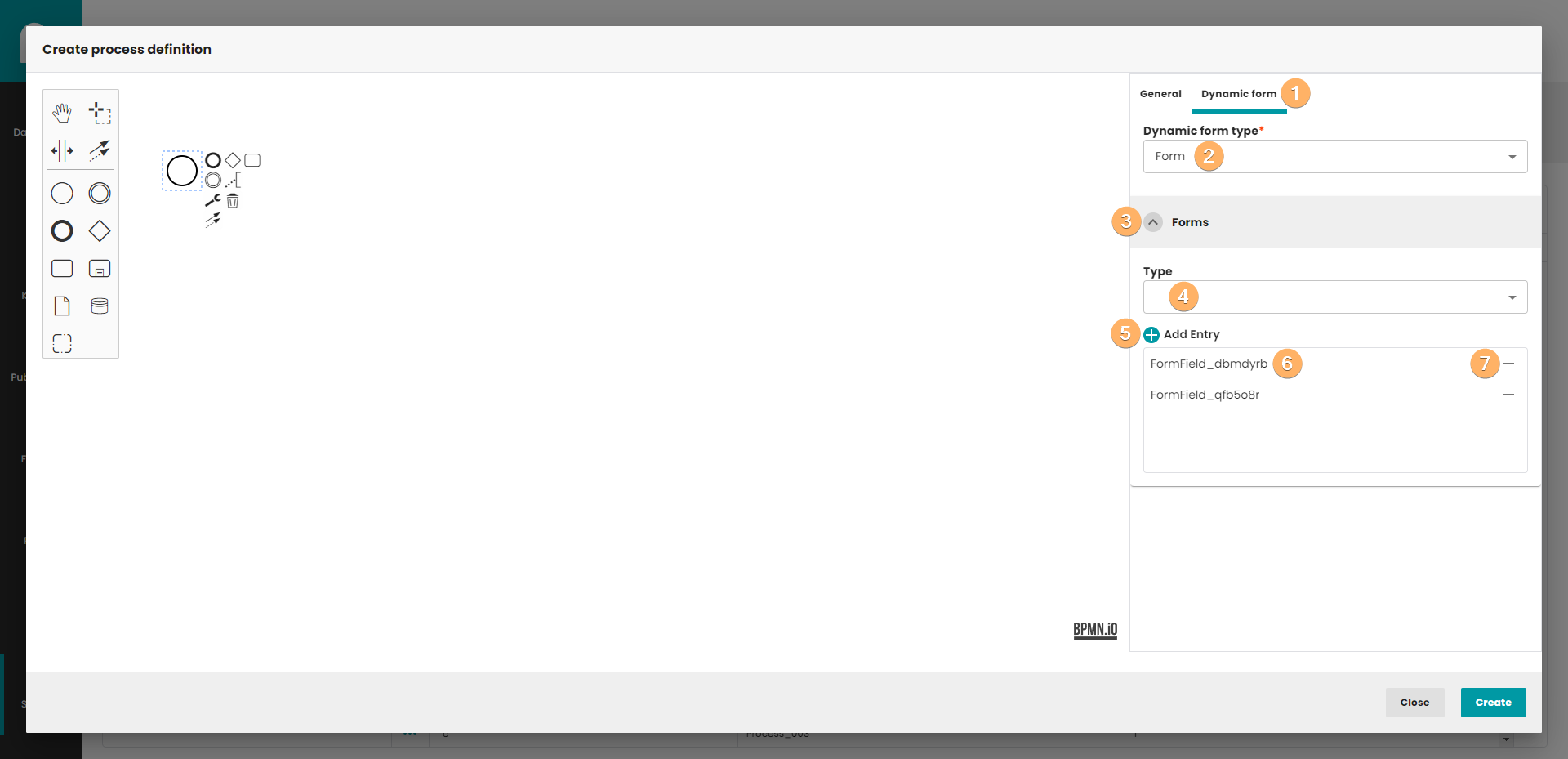
- The tab where you define dynamic GUI for the startup item.
- Dynamic form component with the "Form" option selected. This option displays the component in which you define the Form by yourself.
- The accordion component allows showing and hiding sections of related content on a page.
- You can choose 3 types of form: a) None - default value, preferred to use. b) Embedded or External Task Forms - allow you to embed custom HTML and JavaScript forms into Tasklist in Camunda. c) Camunda Forms - offer visual editing of forms in the Camunda Modeler and can be used for less complex forms. Camunda Forms are the only form type that can be referenced either by Form Key or by Form Reference.
- After click this button, a new entry will be added to the list of form fields.
- List of form fields.
- Button to remove entries from list.
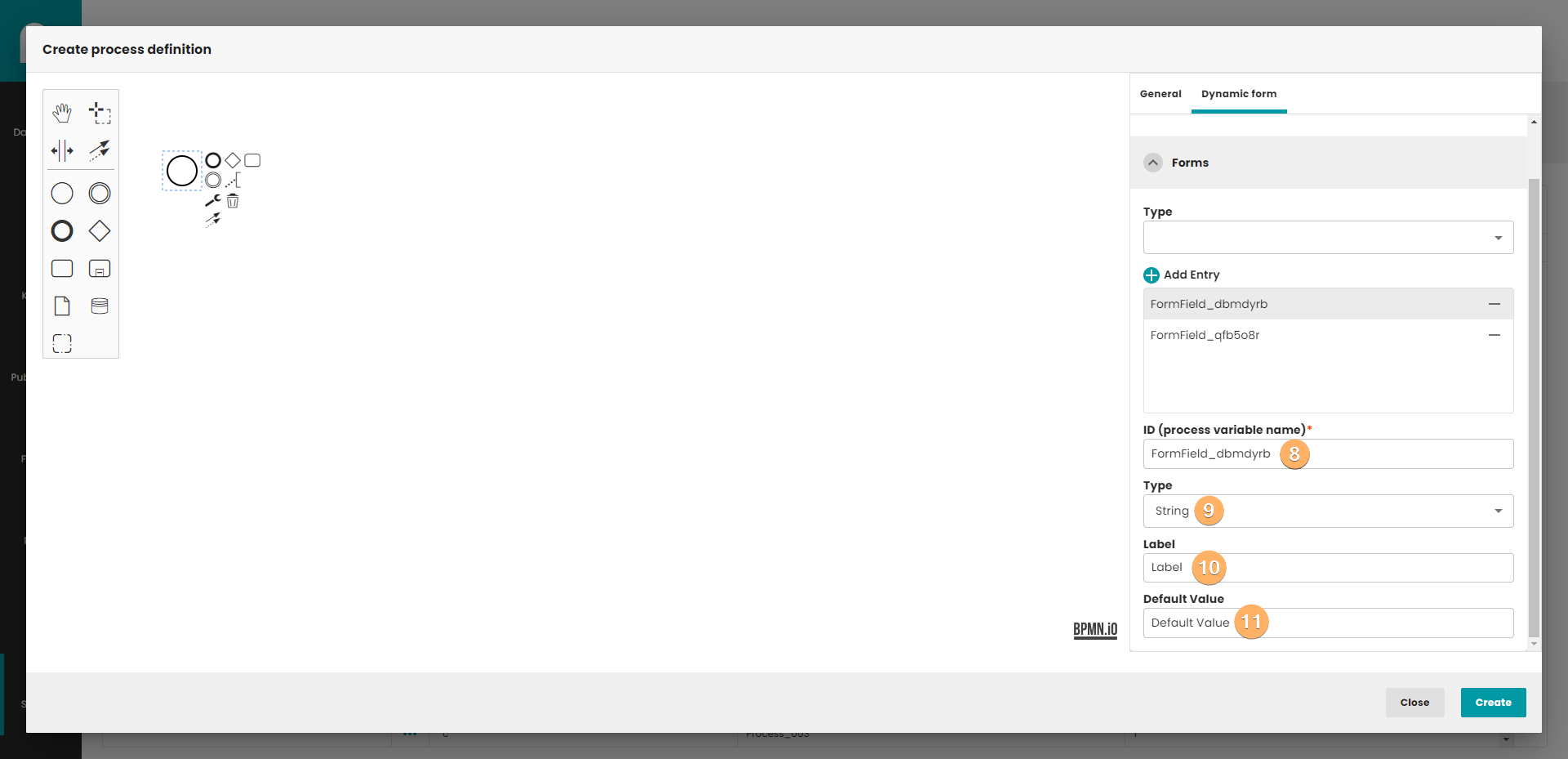
- Process variable name. This field identifies the field in form. Important! The name must be unique and not empty within the form.
- You can choose 7 types of form field:
a) None - default vale. If you choose none type, then deploying process will not be possible. Every field need to set some type.
b) String - sequence of characters.
c) Long - (long integer) variables are stored as signed 32-bit.
d) Boolean - data type that has one of two possible values (true and false).
e) Date - the type of data representing a date.
f) Enum - type, which has a list of key/value pair elements. This type is used to show Combobox in dynamic UI.
g) Custom type - custom type definition. Not recommended to use. - Label that will be shown above the field in form.
- Field default value. Any value can be set, except where enum is specified as the type. Then the value has to be set to match the existing id in the enum list.
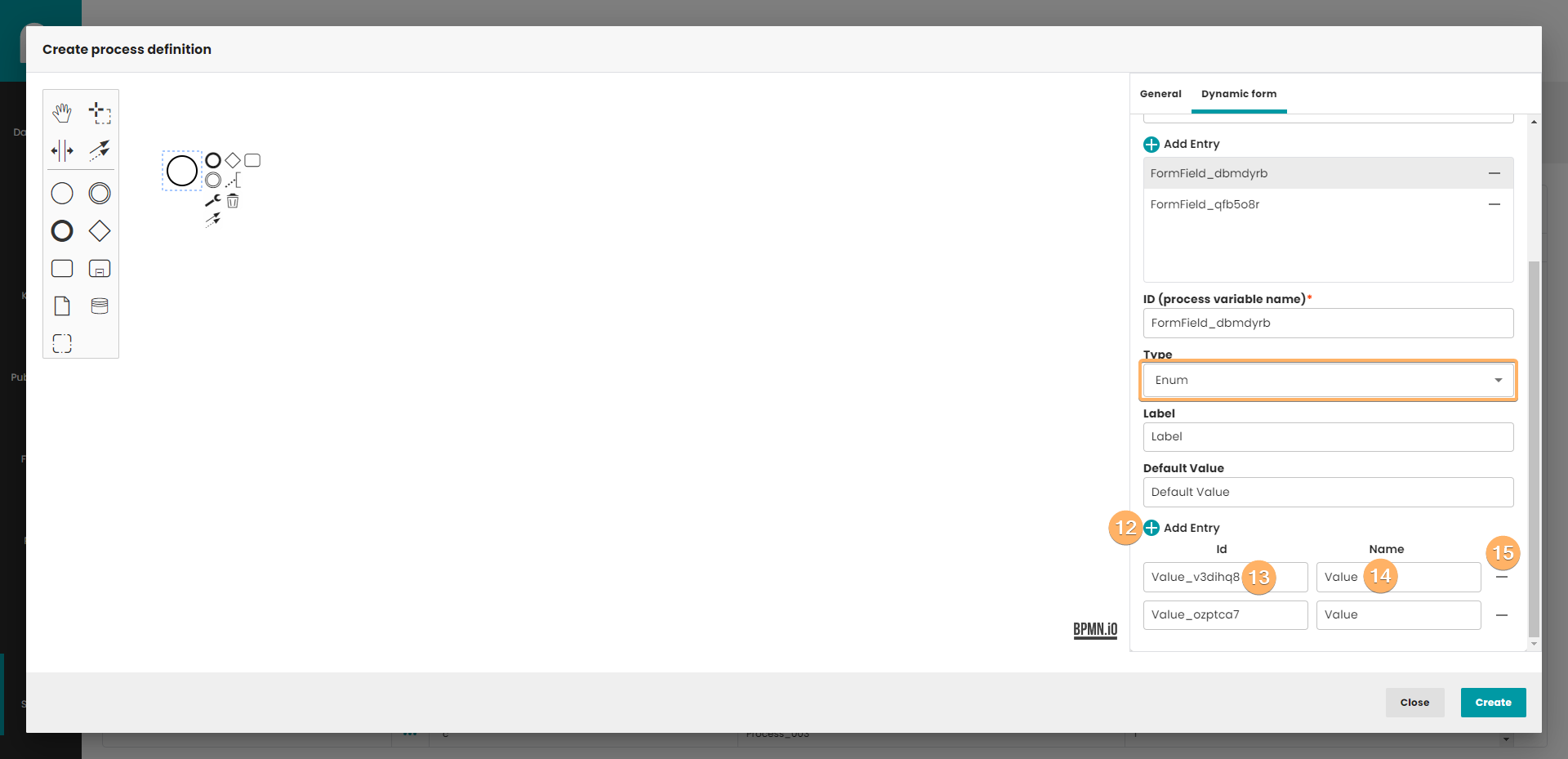
- Add entry to the enum list.
- Entry identifier.
- Entry value.
- Delete entry button.
5 User task
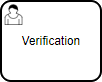
A User Task is used to model work that needs to be done by a human actor. When the process execution arrives at such a User Task, a new task is created in the task list of the user(s) or group(s) assigned to that task.
5.1 General
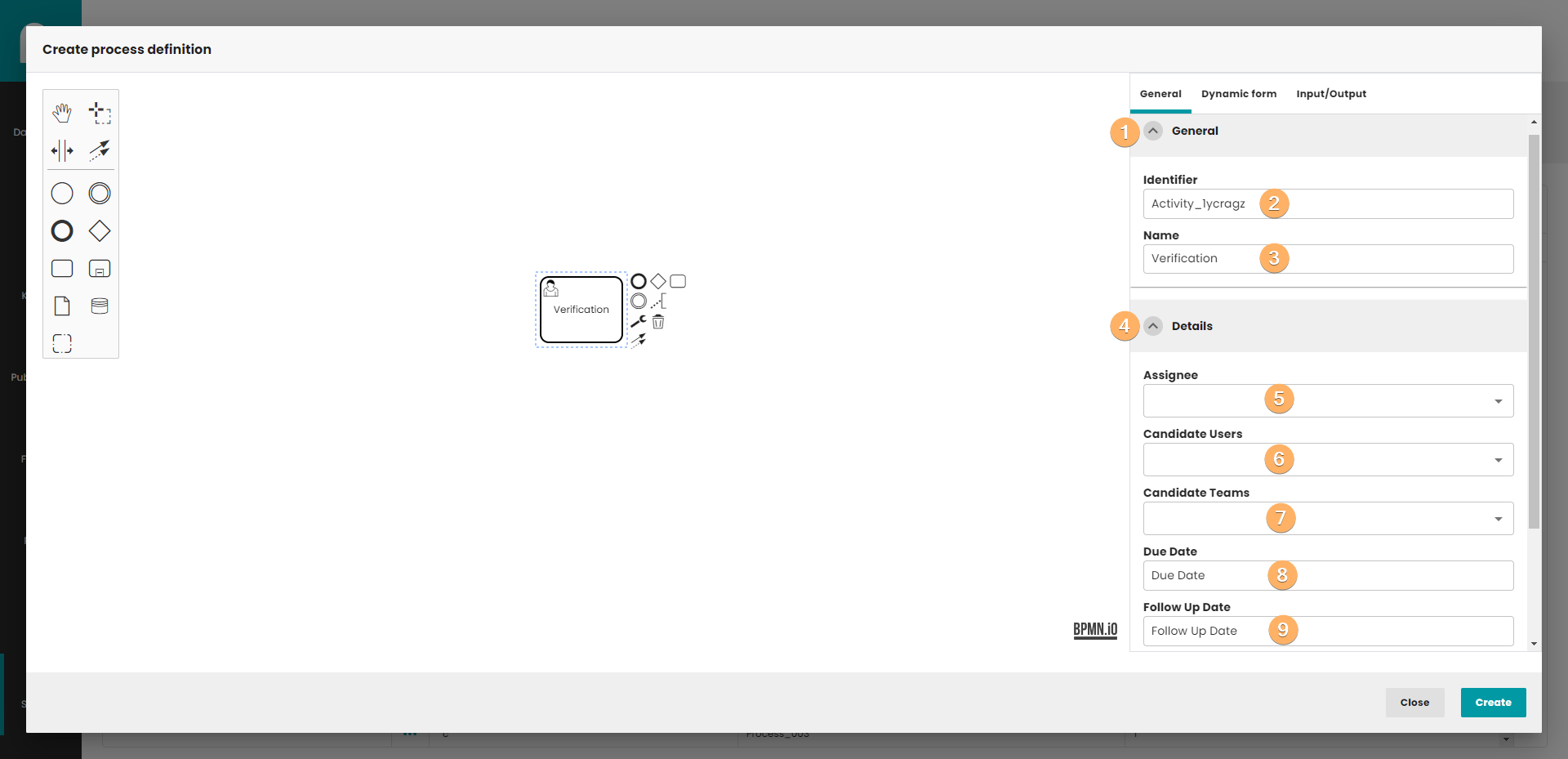
- The accordion component allows showing and hiding sections of related content on a page.
- Element identifier.
- Element name.
- The accordion component allows showing and hiding sections of related content on a page.
- Extension allows direct assignment of a User Task to a given user.
- Extension allows you to make a user/users a candidate for a task.
- Extension allows you to make a team/teams a candidate for a task.
- The attribute specifies the initial due date of a user task when it is created.
- Each task has a field indicating the follow up date of that task. The Query API can be used to query for tasks that need to be followed up on, before or after a certain date.
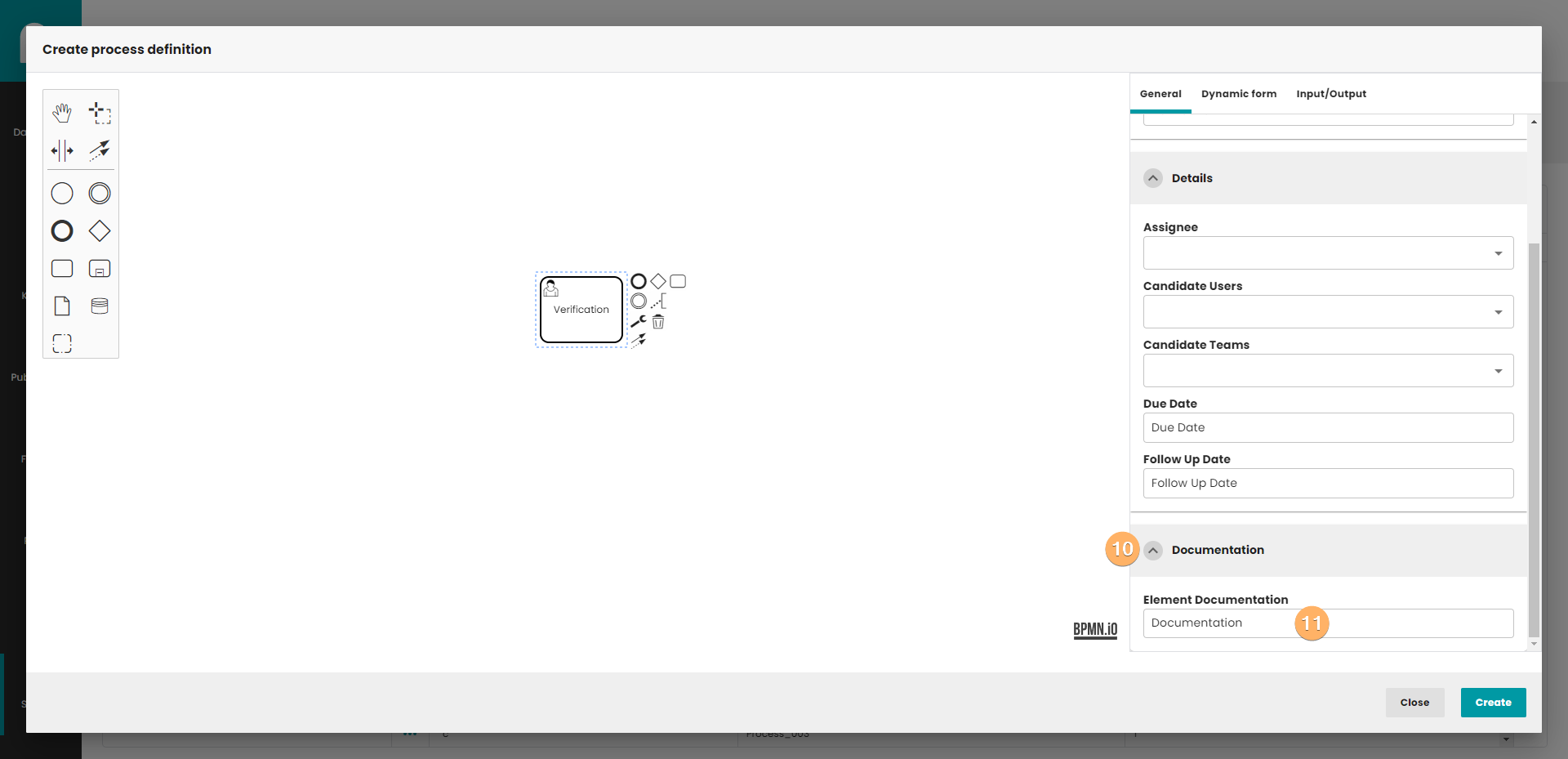
- The accordion component allows showing and hiding sections of related content on a page.
- User task documentation.
5.2 Dynamic form
The dynamic form works in the same way as presented in the start event (4.2)
5.3 Input/Output
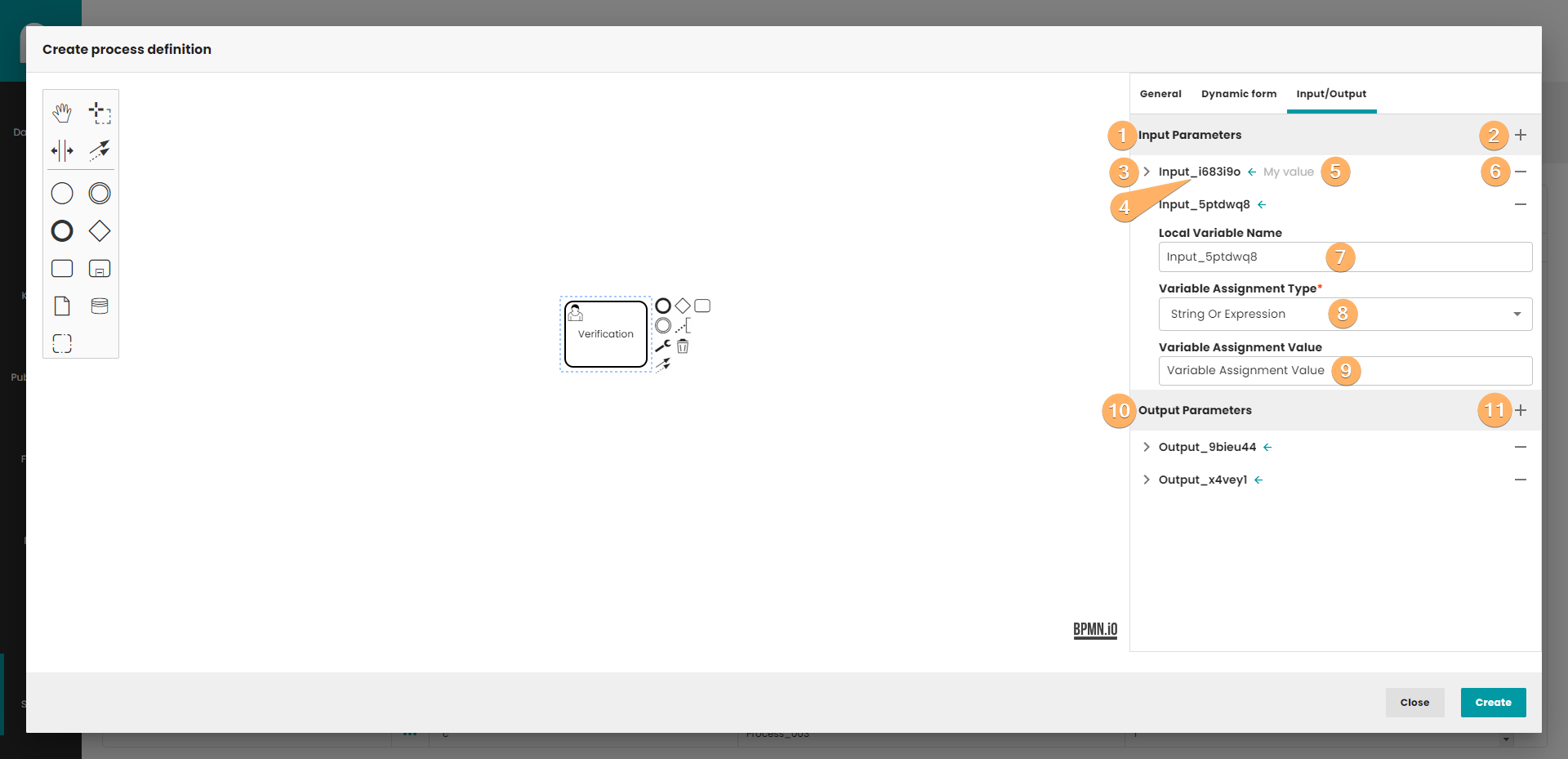
- Input parameter container.
- Button for adding a new input parameter.
- The arrow that shows/hides parameter details. After unfolding the details, editing is possible.
- Parameter identifier.
- Parameter value.
- Button for removing paramter from list.
- Field that input parameter name can be changed.
- A variable that specifies the type of the parameter. We can distinguish 4 types of parameters (String Or Expression/Script/List/Map). All parameters will be described later in the article.
- This field is dynamic and looks different for each type of parameter. In this case it is a text field because the type selected is String Or Expression.
- Output parameter container.
- Button for adding a new output parameter.
The input and output parameters are constructed in the same way, so we will not present both. The only difference for both parameter types is that one is in the input parameter collection and the other is in the output parameter collection.
5.3.1 String Or Expression
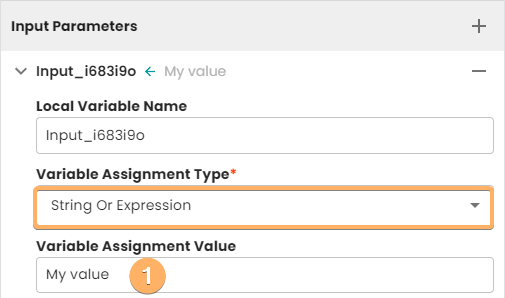
- String or expression value.
5.3.2 Script
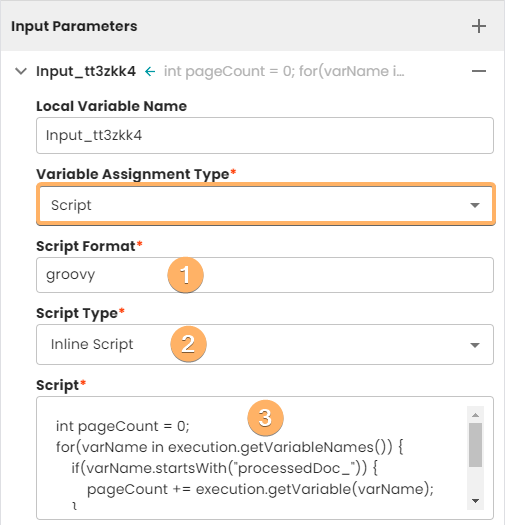
- Currently Camunda test the integration for Groovy, JavaScript, JRuby and Jython. To use a scripting engine it is necessary to add the corresponding jar to the classpath. In our implementation Groovy is the language that we support.
- You can choose from three options: inline script, external resource and none.
- After choosing inline script you will be able to write your own script in Groovy. The script source code can be loaded from an external resource by providing path to the file.
5.3.3 List
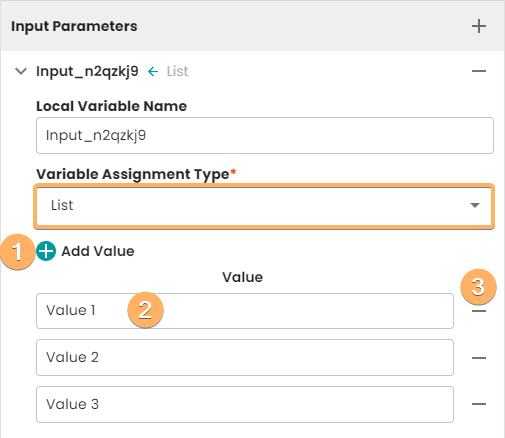
- Button for adding a new entry to list.
- Entry value.
- Button for removing entry from list.
5.3.4 Map
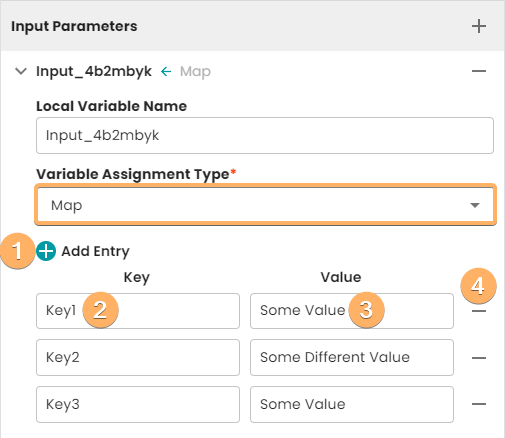
- Button for adding a new map entry.
- Entry key.
- Entry value.
- Button for removing entry from map.
5.4 Creating element template
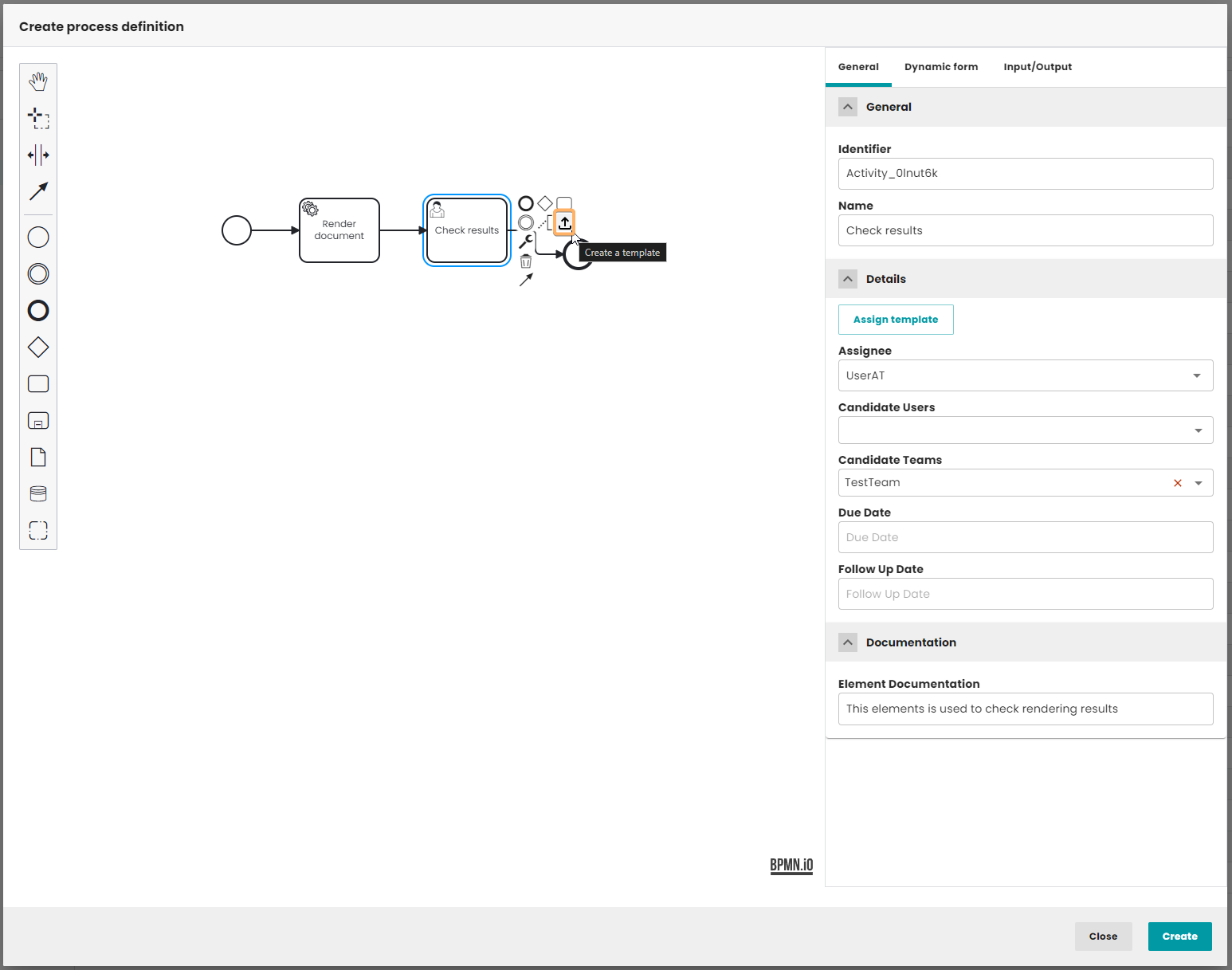
Once you have created and set up a service task, you can create a template from it. To do this, select the service task and choose "Create template" from the context menu (see the image above).
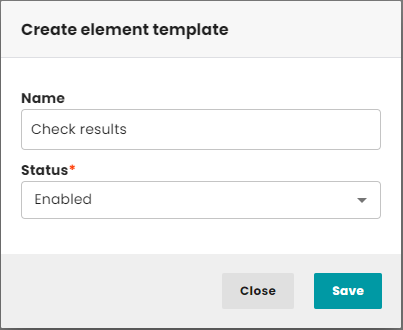
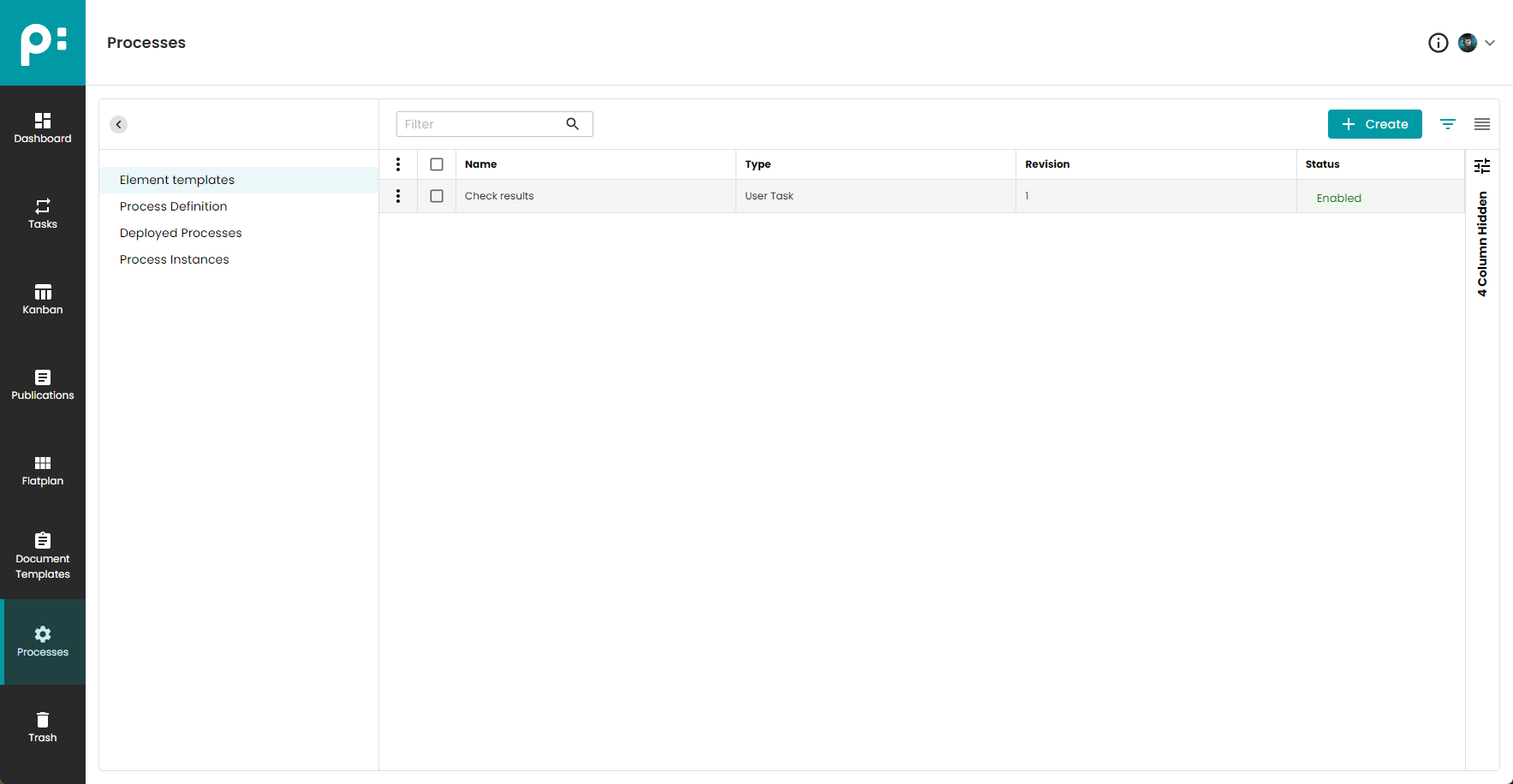
In the next step you will be asked to provide a name for the template and specify the status (enabled/disabled). When everything is filled in, click the "Save" button. After that, all settings will be saved, and you will be able to find the template itself in the "Element templates" tab.
5.5 Assigning element template
User task has the ability to assign a template element from the list of existing templates. To assign a template to a task, select the user task and in the General -> Details tab, press the "Assign template" button.
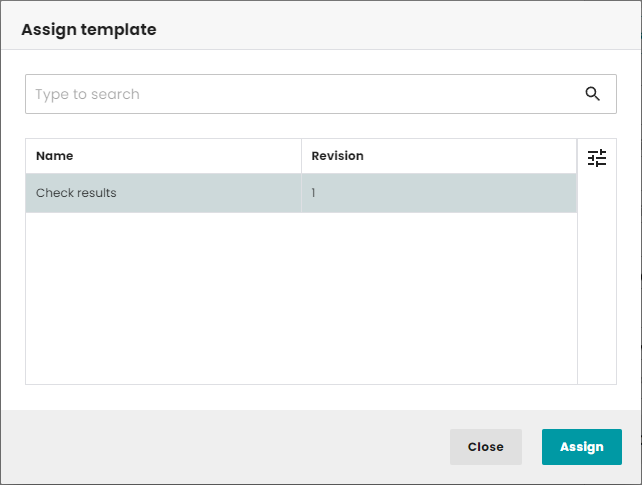
After pressing the button, a window will be displayed with a list of templates available for the given task type and status (enabled). Only templates with the highest revision number will appear. After selecting a template and pressing the "Assign" button, the template will replace the task it was selected for. All properties will be overwritten except the identifier.
6 Service task
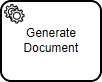
A Service Task is used to invoke services. In Camunda this is done by calling Java code or providing a work item for an external worker to complete asynchronously or invoking a logic which is implemented in form of webservices.
The return value of a service execution (for a Service Task exclusively using expressions) can be assigned to an already existing or to a new process variable by specifying the process variable name as a literal value for the camunda:resultVariable attribute of a Service Task definition. Any existing value for a specific process variable will be overwritten by the result value of the service execution. When not specifying a result variable name, the service execution result value is ignored.
6.1 General
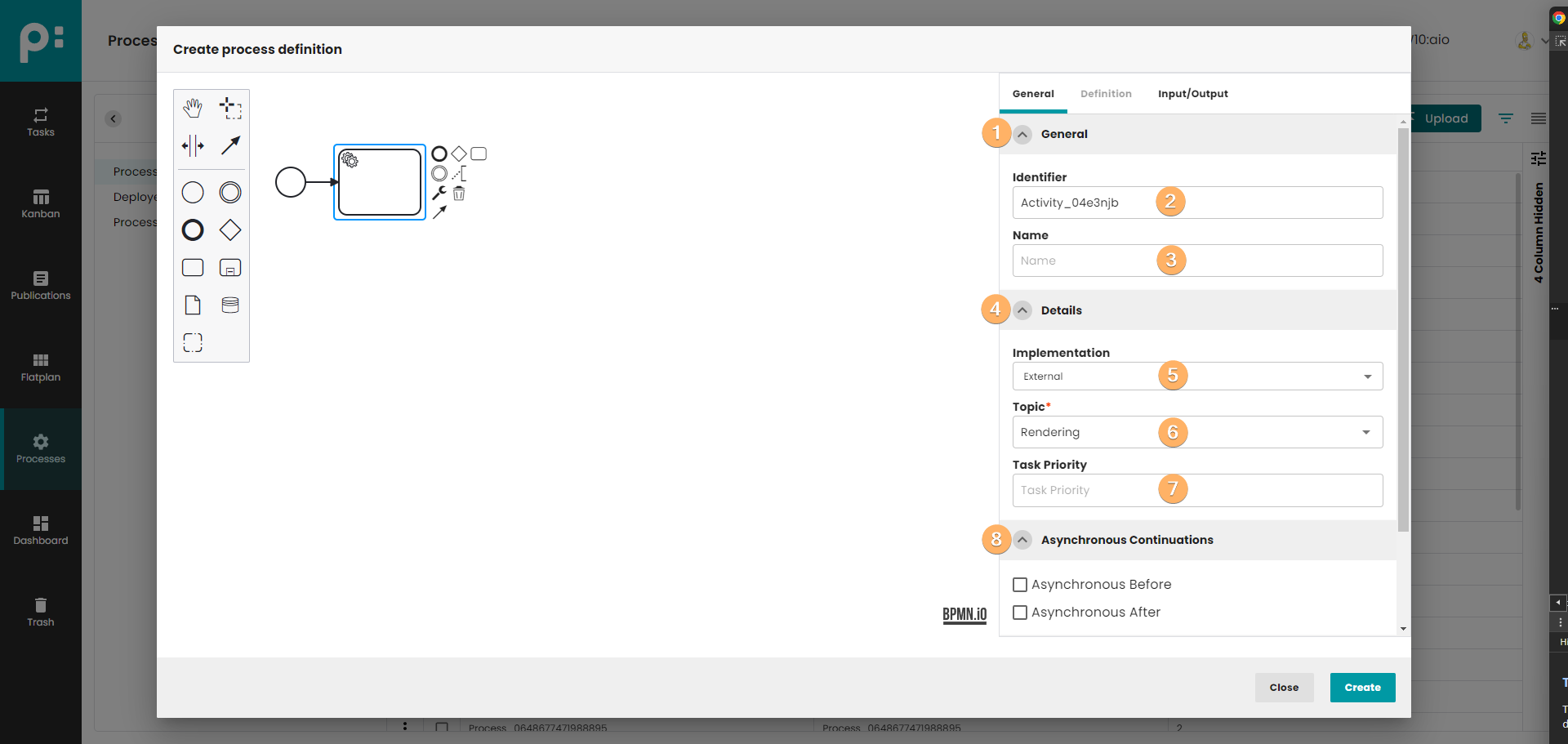
- The accordion component allows showing and hiding sections of related content on a page.
- Element identifier.
- Element name.
- The accordion component allows showing and hiding sections of related content on a page.
- Implementation type. You can choose two type implementation: external and delegate expression. After choosing expression, the topic and task priority fields appear. If delagate expression will be selected then delegate expression field will appear.
- The subject is defined in Camunda and all workers establish a connection with Camunda
using the appropriate topic. Currently, we can choose one of 4 topics or enter the topic manually.
Topics that can be selected:
a) Rendering - used by the workers defined in the rendering service. Such workers can: render document, export pdf, export indd packages etc. When this option is chosen, the Definition tab is disabled.
b) Plugin Methods - used to execute Java plugin methods.
c) Legacy Download Methods - used to run legacy download methods (not recommended to use).
d) Legacy Workflow Methods - used to run legacy workflow methods (not recommended to use). - A priority is a natural number in the range of a Java long value. A higher number represents a higher priority. Once assigned, the priority is static, meaning that the process engine will not go through the process of assigning a priority for that job again at any point in the future.
- The accordion component allows showing and hiding sections of related content on a page.
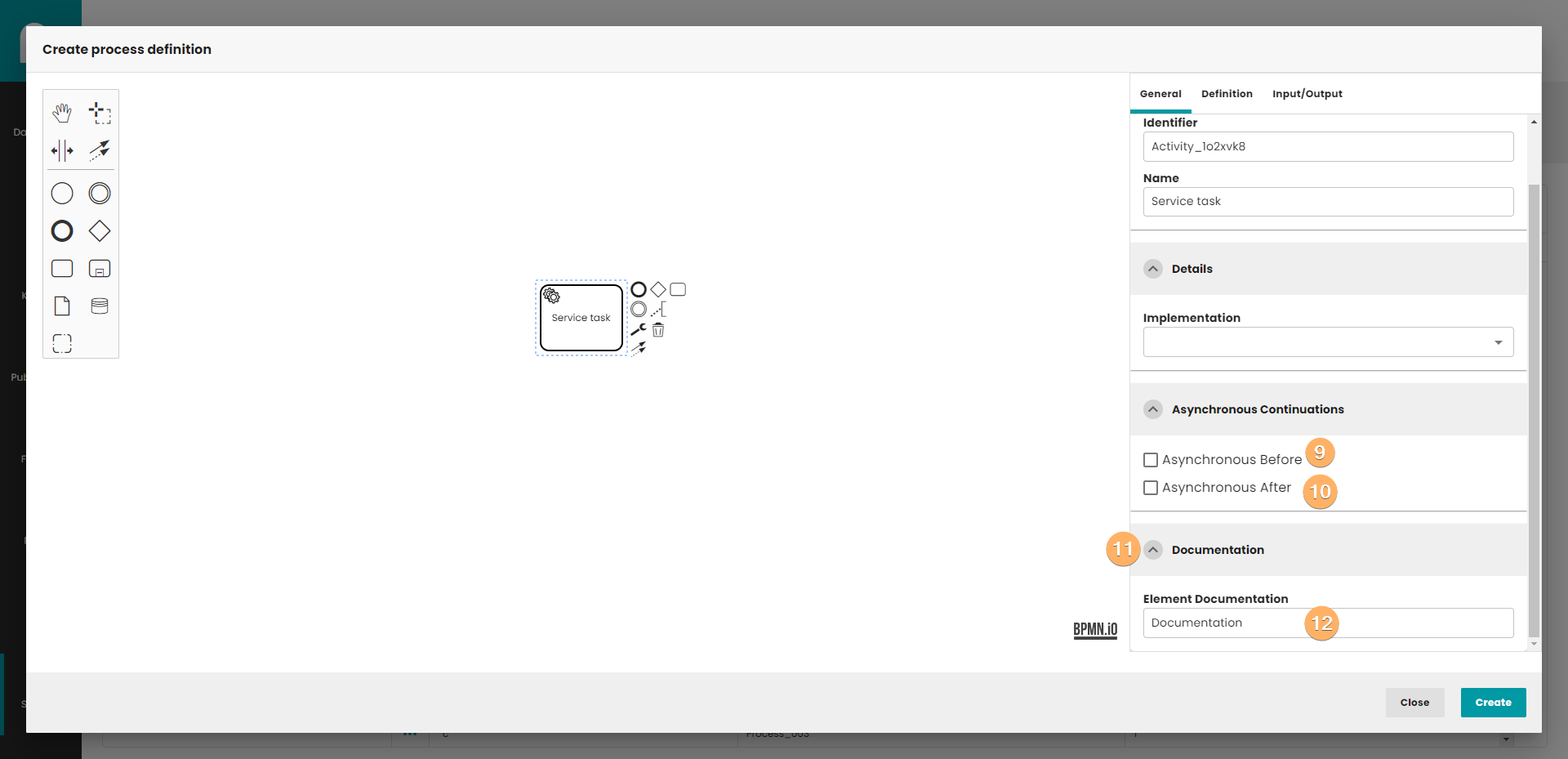
- Specifies an asynchronous continuation before an activity. Possible values true/false.
- Specifies an asynchronous continuation after an activity. Possible values true/false.
- The accordion component allows showing and hiding sections of related content on a page.
- Service task documentation.
6.2 Definition
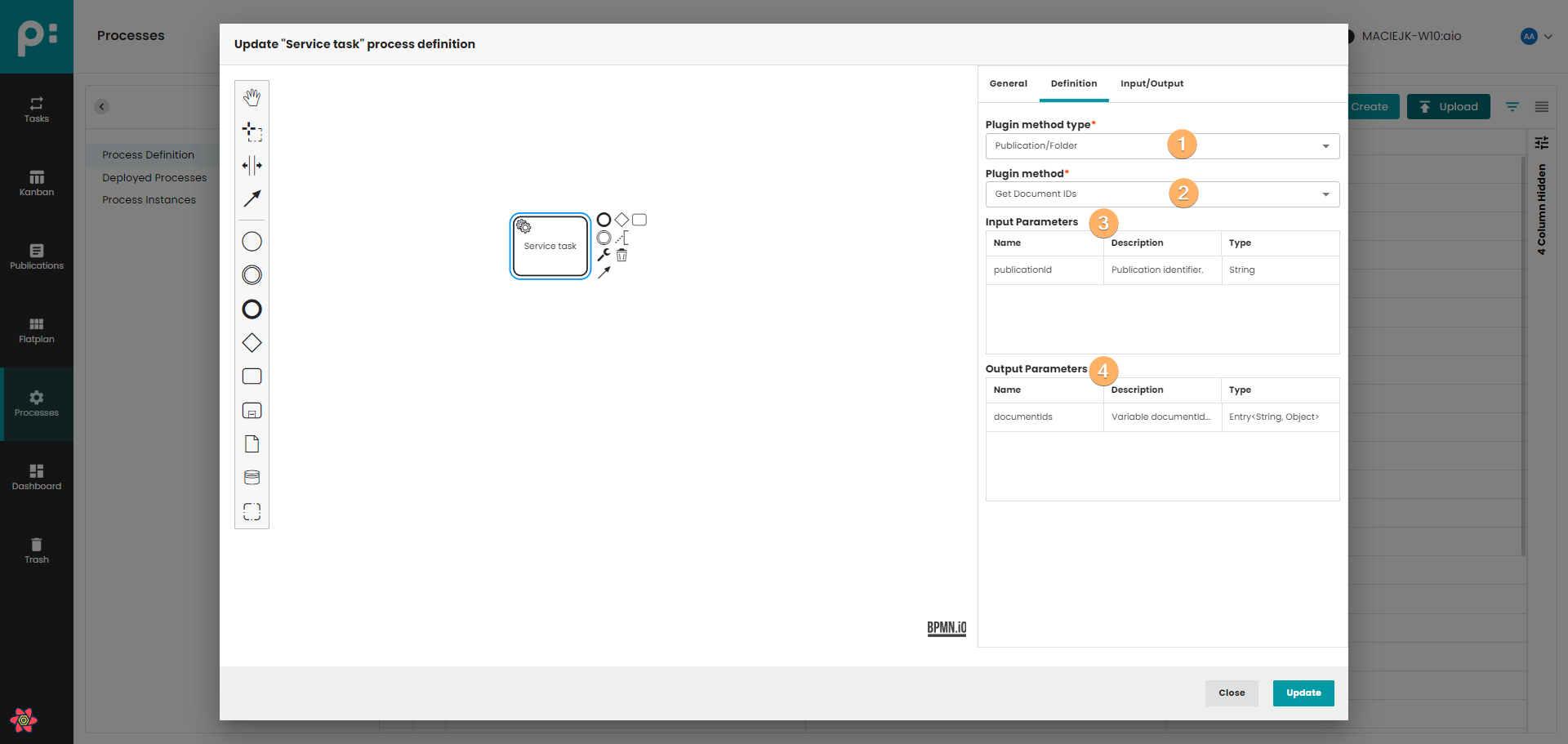
- This field is used to select the plugin method type. There are three possible types to choose: Document, Publication and Folder. After making the selection, the list of methods will be filtered according to the selected type.
- List of filtered plugin method. The method selected here will be performed by the worker. After selecting method, the Input parameter is automatically cleared and the new parameters are saved automatically.
- Table indicating the input parameters of the method selected in point 2. Object visible only for method types (document and Publication/Folder).
- Table indicating the output parameters of the method selected in point 2. Object visible only for method types (document and Publication/Folder).
6.3 Input/Output
Input/Output works in the same way as presented in the user task (5.3)
6.4 Creating element template
Input/Output works in the same way as presented in the user task (5.4)
6.5 Assigning element template
Assigning element template works in the same way as presented in the user task (5.5)
7 Gateways
Gateways control the flow of tokens in the process. Enable you to make modeling decisions based on data and events, as well as fork / join concurrency. There are 5 types of gates in bpmn. All types are described below.
7.1 Exclusive gateway
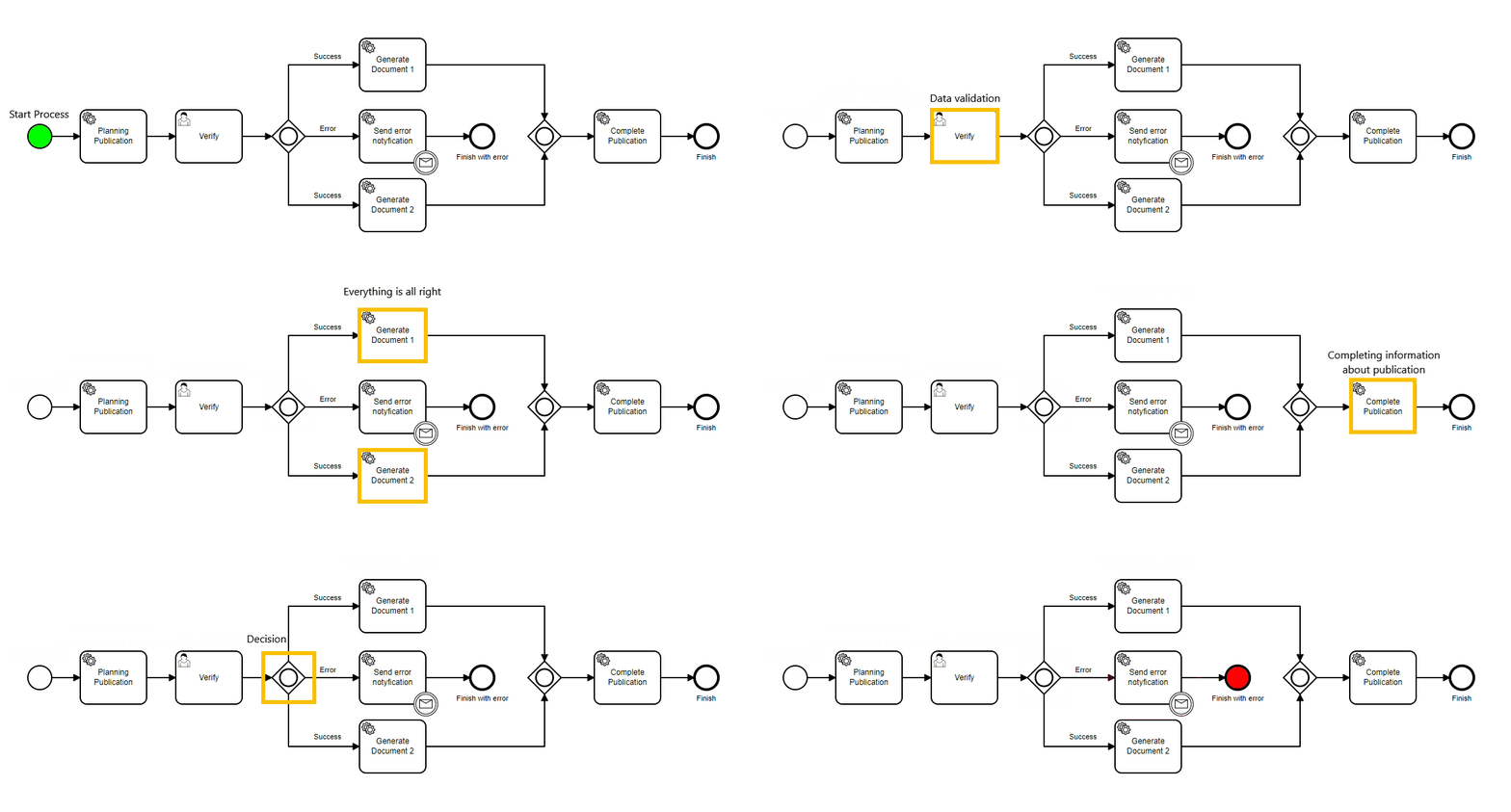
 | An exclusive gateway (also called the XOR gateway or, in more technical terms, the exclusive data-based gateway), is used to model a decision in the process. When the execution arrives at this gateway, all outgoing sequence flows are evaluated in the order in which they have been defined. The sequence flow which condition evaluates to ‘true’ (or which doesn’t have a condition set, conceptually having a ‘true’ value defined on the sequence flow) is selected for continuing the process. Note that only one sequence flow is selected when using the exclusive gateway. In case multiple sequence flow have a condition that evaluates to ‘true’, the first one defined in the XML is exclusively selected for continuing the process. If no sequence flow can be selected (no condition evaluates to ‘true’) this will result in a runtime exception, unless you have a default flow defined. One default flow can be set on the gateway itself in case no other condition matches - like an ‘else’ in programming languages. |
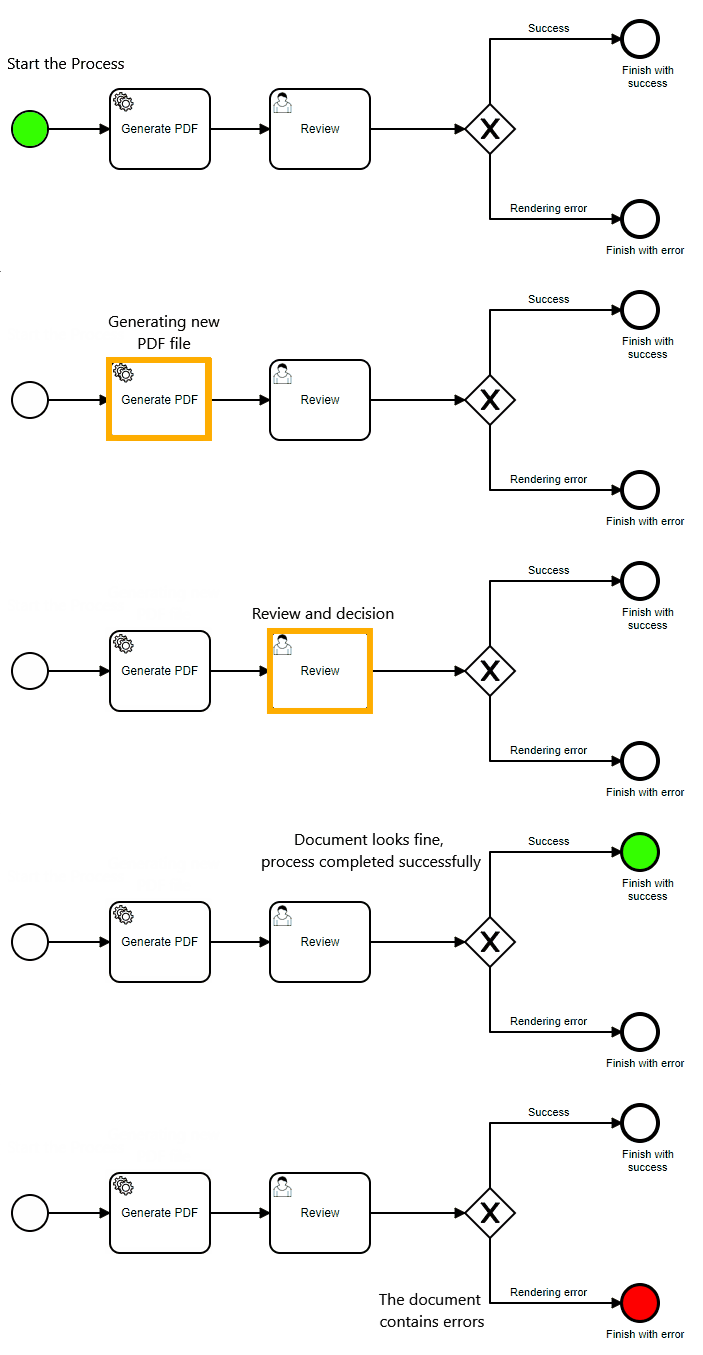
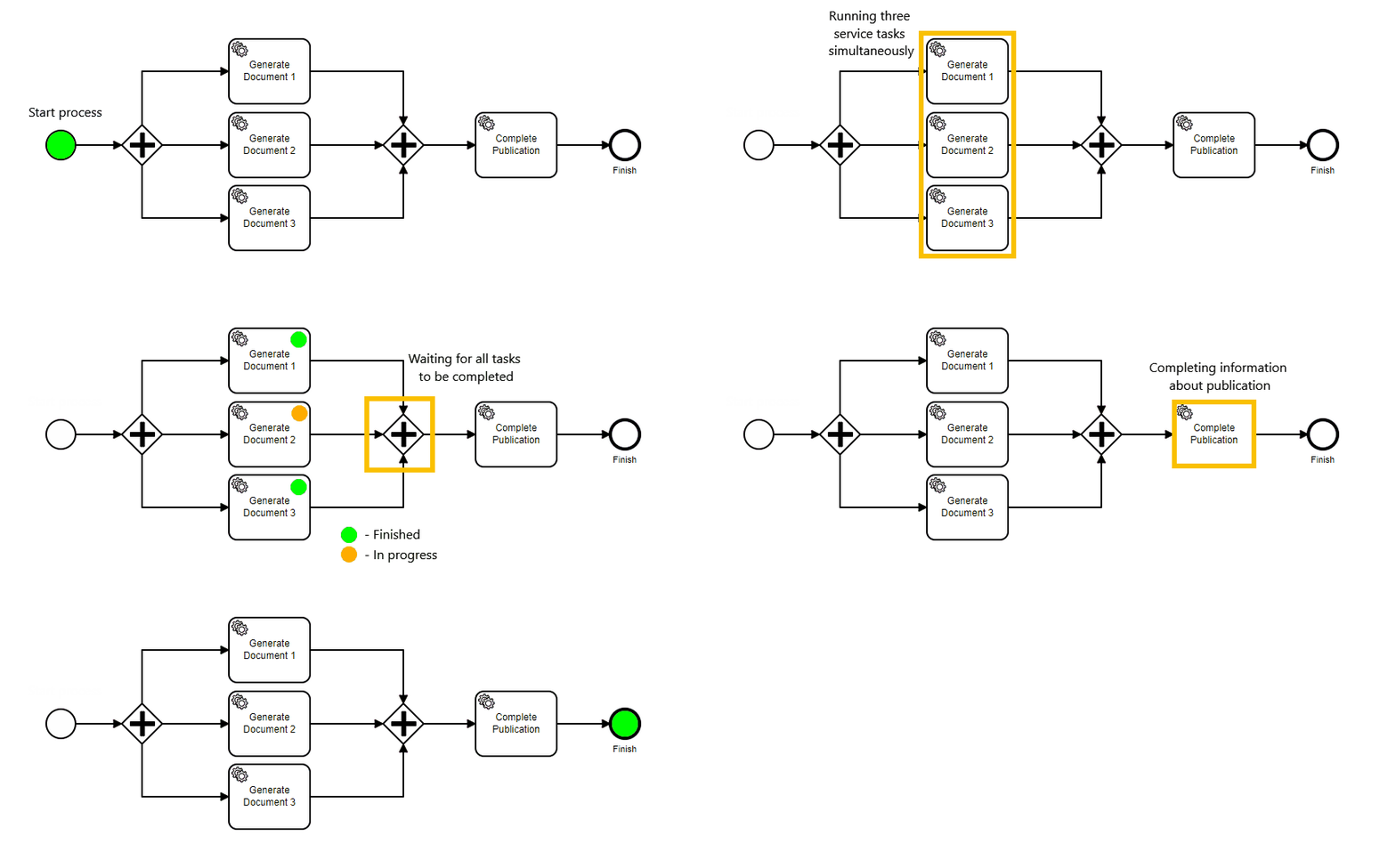
7.2 Parallel gateway
 | Gateways can also be used to model concurrency in a process. The most straightforward gateway to introduce concurrency in a process model is the Parallel Gateway, which allows forking into multiple paths of execution or joining multiple incoming paths of execution.The functionality of the parallel gateway is based on the incoming and outgoing sequence flow(s):
|
7.3 Inclusive gateway
 | The Inclusive Gateway can be seen as a combination of an exclusive and a parallel gateway. Like an exclusive gateway, you can define conditions on outgoing sequence flows and the inclusive gateway will evaluate them. However, the main difference is that the inclusive gateway can receive more than one sequence flow, like a parallel gateway. |
7.4 Event based gateway
 | The event-based Gateway allows you to make a decision based on events. Each outgoing sequence flow of the gateway needs to be connected to an intermediate catching event. When process execution reaches an event-based Gateway, the gateway acts like a wait state: execution is suspended. In addition, an event subscription is created for each outgoing sequence flow. Important! This type of gateway is not supported by embedded modeler, but it works with Camunda. You can use the Camunda modeler to fully use the potential of this element. |
7.5 Complex gateway
 | A Complex Gateway allows the modeler to specify any arbitrary rules needed to determine how to emit tokens or process arriving tokens. Important! This type of gateway is not supported by Camunda. |
7.6 Gateways properties
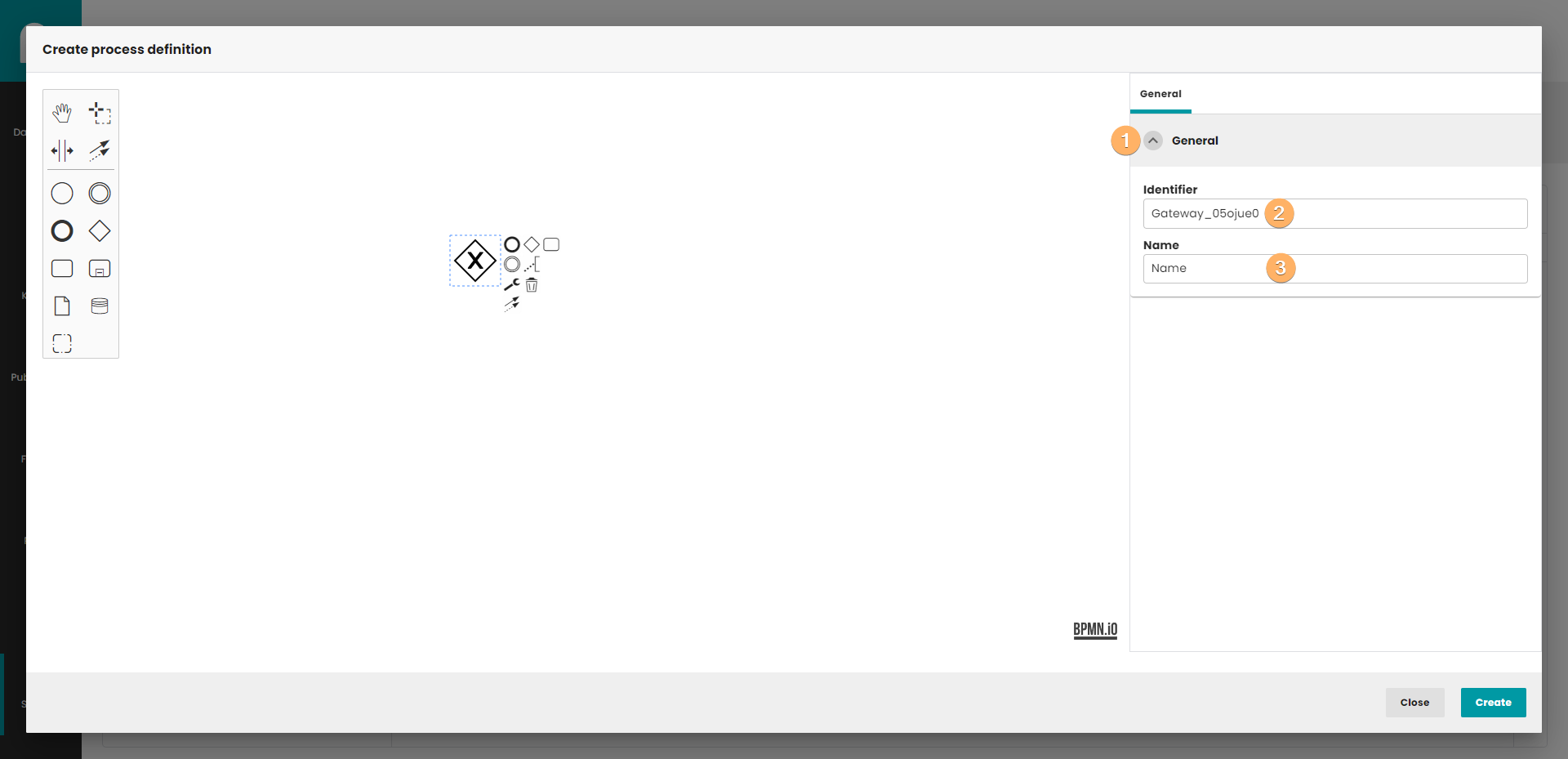
- The accordion component allows showing and hiding sections of related content on a page.
- Gateway identifier.
- Gateway name.
8 Flows
A Sequence Flow is used to show the order that Activities will be performed in a Process. Each Sequence Flow has only one source and only one target.
8.1 sequence flow
A Sequence Flow is a line with a solid arrowhead drawn with a solid single line.

8.2 Conditional sequence flow
A Sequence Flow can optionally define a condition Expression, indicating that the token will be passed down the Sequence Flow only if the Expression evaluates to true. This Expression is typically used when the source of the Sequence Flow is a Gateway or an Activity.

8.3 Default sequence flow
A Sequence Flow that has an Exclusive, Inclusive, or Complex Gateway or an Activity as its source can also be defined with as default. Such a Sequence Flow will have a marker to show that it is a default flow. The default Sequence Flow is taken (a token is passed) only if all the other outgoing Sequence Flows from the Activity or Gateway are not valid (i.e., their condition Expressions are false)

8.4 Flow properties
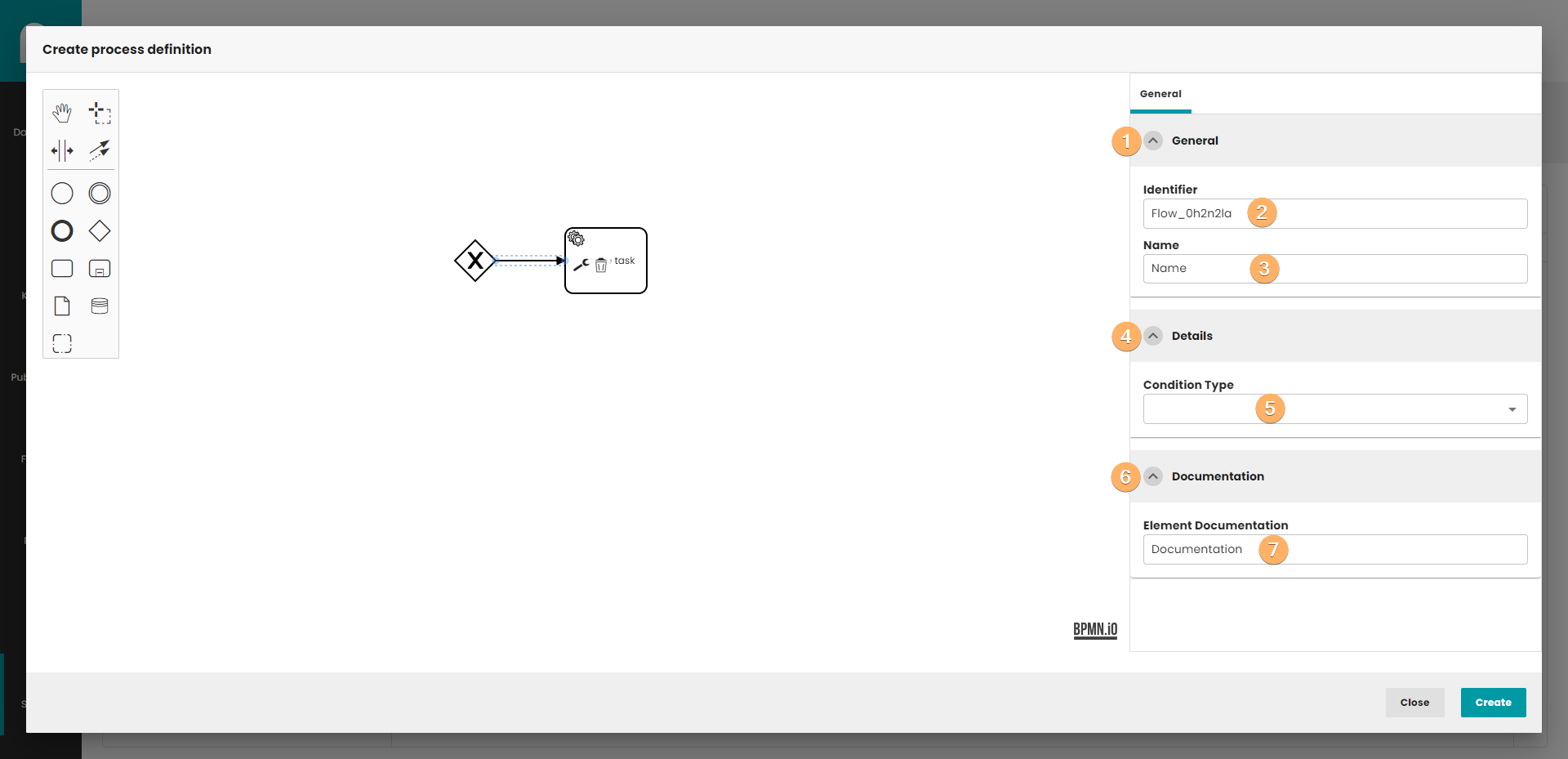
- The accordion component allows showing and hiding sections of related content on a page.
- Gateway identifier.
- Gateway name.
- The accordion component allows showing and hiding sections of related content on a page.
- You can select here flow condition type. You can choose from three options: extension, script and none. The individual options will be described later in the article.
- The accordion component allows showing and hiding sections of related content on a page.
- Flow documentation.
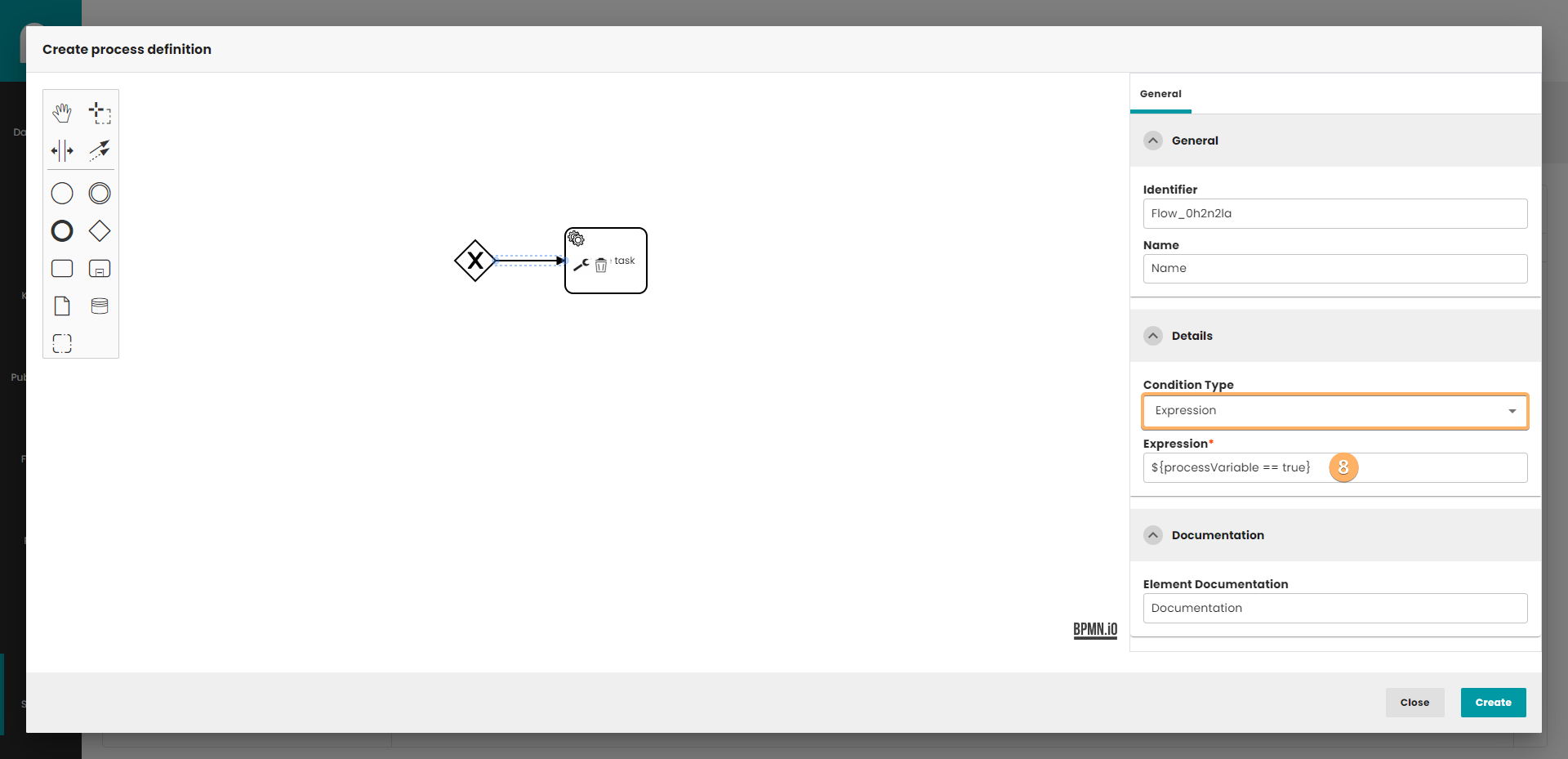
- Expression defines when a flow is taken. It is a boolean expression that can access the process instance variables and compare them with literals or other variables. The condition is fulfilled when the expression returns true.
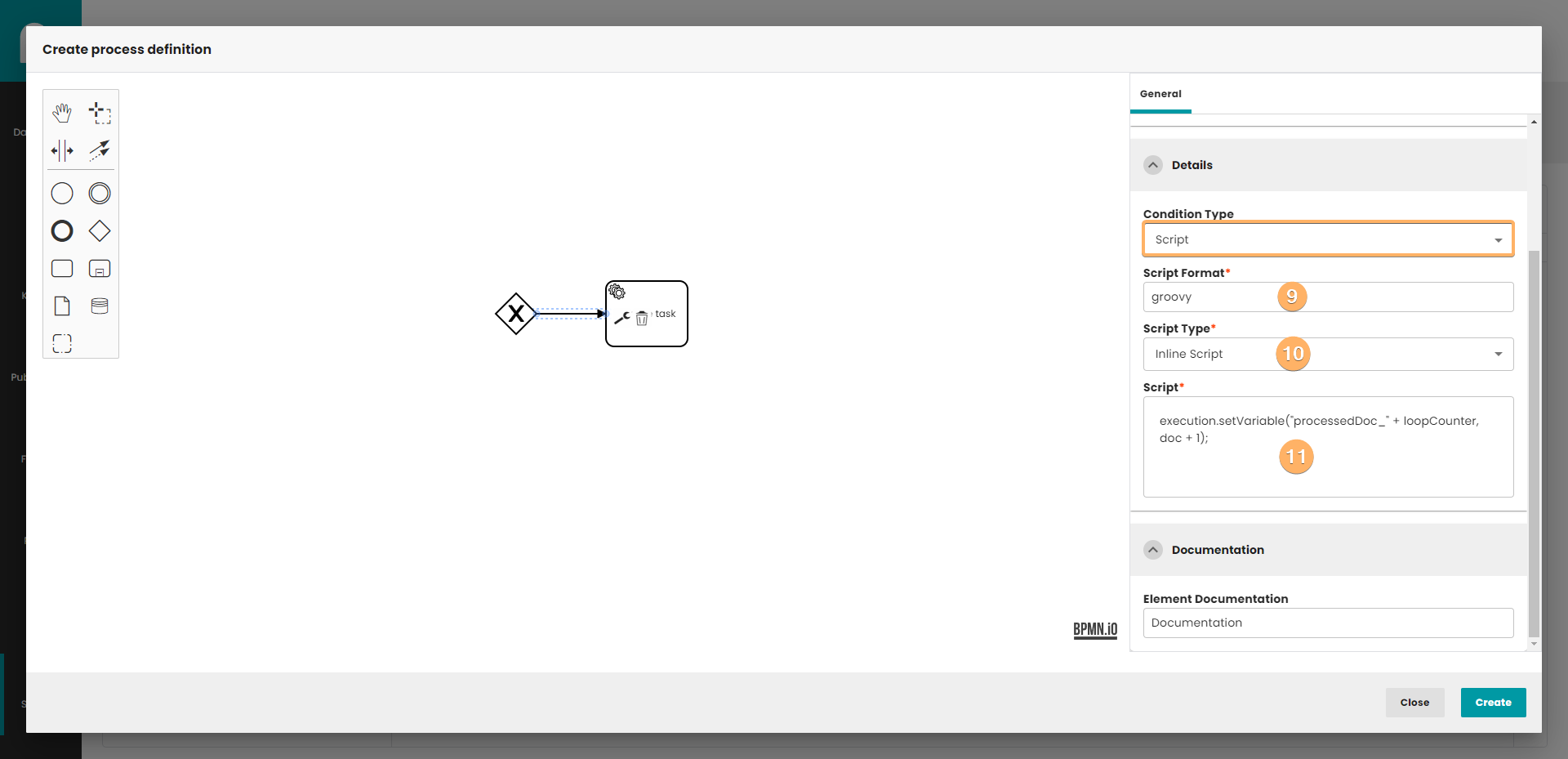
- Currently Camunda test the integration for Groovy, JavaScript, JRuby and Jython. To use a scripting engine it is necessary to add the corresponding jar to the classpath. In our implementation Groovy is the language that we support.
- You can choose from three options: inline script, external resource and none.
- After choosing inline script you will be able to write your own script in Groovy. The script source code can be loaded from an external resource by providing path to the file.
9 SubProcess
A subprocess is an activity that contains other activities, gateways, events, etc., which itself forms a process that is part of a bigger process. A subprocess is completely defined inside a parent process (that’s why it’s often called an embedded Subprocess).
Subprocesses have two major use cases:
- Subprocesses allow hierarchical modeling. Many modeling tools allow that subprocesses can be collapsed, hiding all the details of the subprocess and displaying a high-level, end-to-end overview of the business process.
- A subprocess creates a new scope for events. Events that are thrown during execution of the subprocess can be caught by a boundary event on the boundary of the subprocess, thus creating a scope for that event, limited to the subprocess.
Using a subprocess does impose some constraints:
- A subprocess can only have one none start event, no other start event types are allowed. A subprocess must have at least one end event. Note that the BPMN 2.0 specification allows to omit the start and end events in a subprocess, but the current engine implementation does not support this.
- Sequence flows can not cross subprocess boundaries.
9.1 General
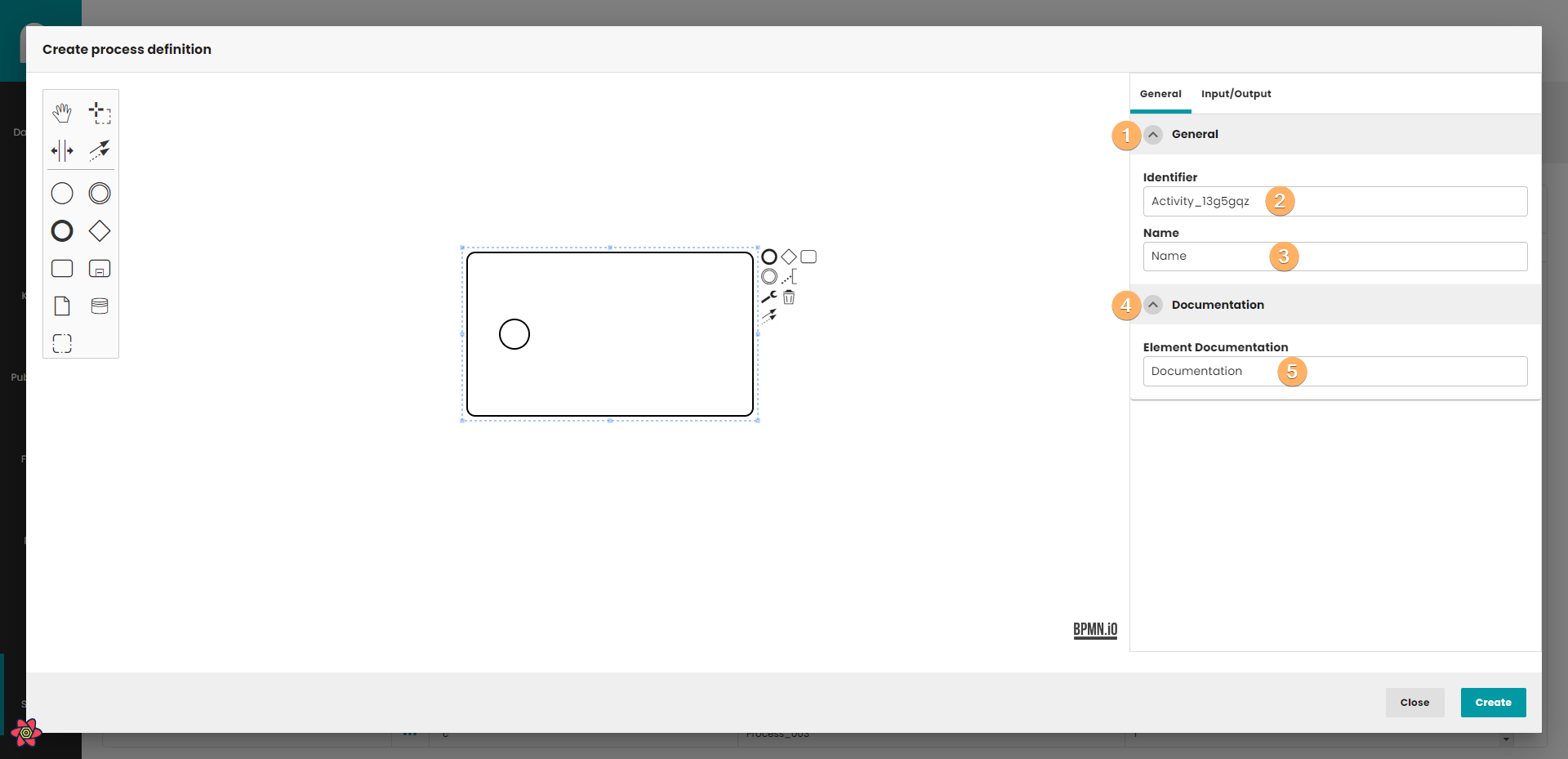
- The accordion component allows showing and hiding sections of related content on a page.
- Gateway identifier.
- Gateway name.
- The accordion component allows showing and hiding sections of related content on a page.
- SubProcess documentation.
9.2 Multi instance
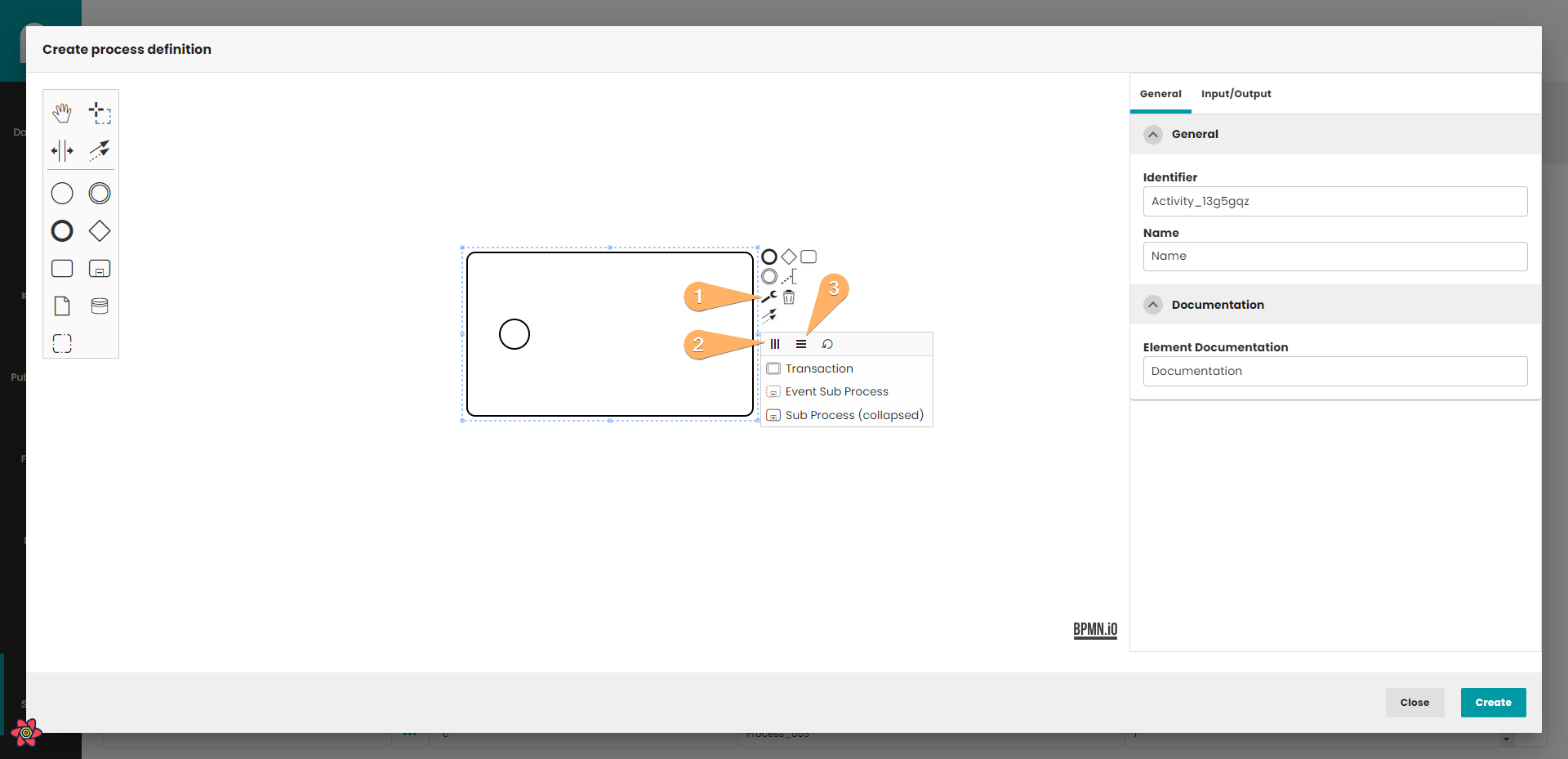
- Change type button.
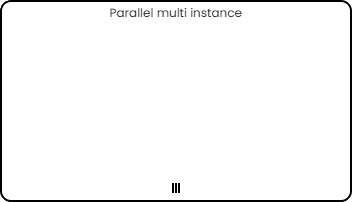
- Parallel multi instance.
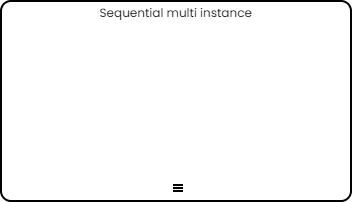
- Sequential multi instance.
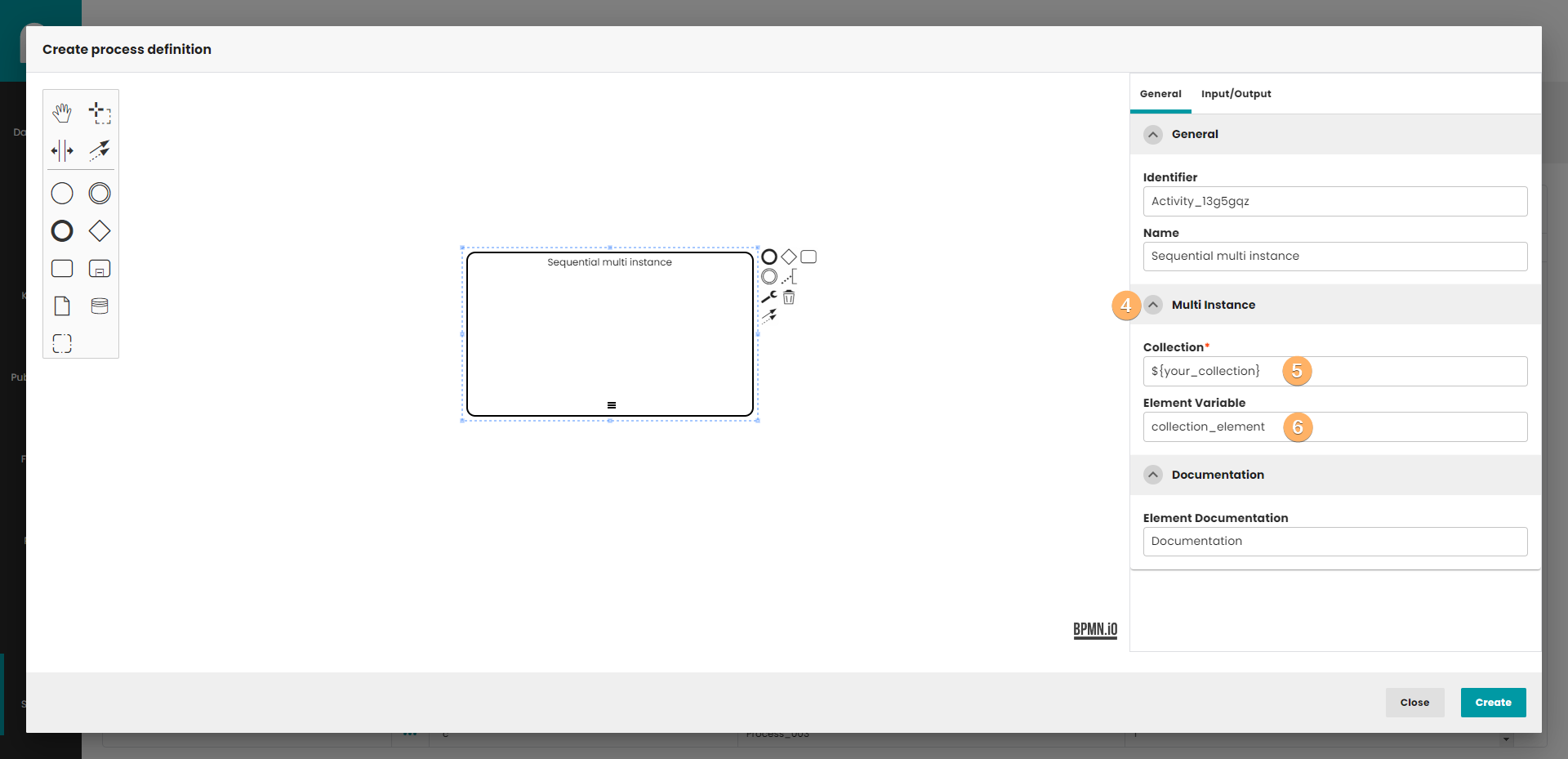
- The accordion component allows showing and hiding sections of related content on a page.
- Collection from which the new activity will be created. The number of activity that will be created corresponds to the number of items in the collection.
- Collection element, that can be used in new process instance.
9.2.1 Parallel multi instance
Three vertical lines indicate that the multi-instance activity is non-sequential. This means that the activity can be completed for each item in the collection in no particular order.
9.2.2 multi instance
Three horizontal lines indicate that the multi-instance activity is sequential. This means that the activity must complete for each item in the order that they are received within the collection.
9.3 Input/Output
Input/Output works in the same way as presented in the user task (5.3)
10 Timer
The embedded modeler supports timer elements in processes as well.
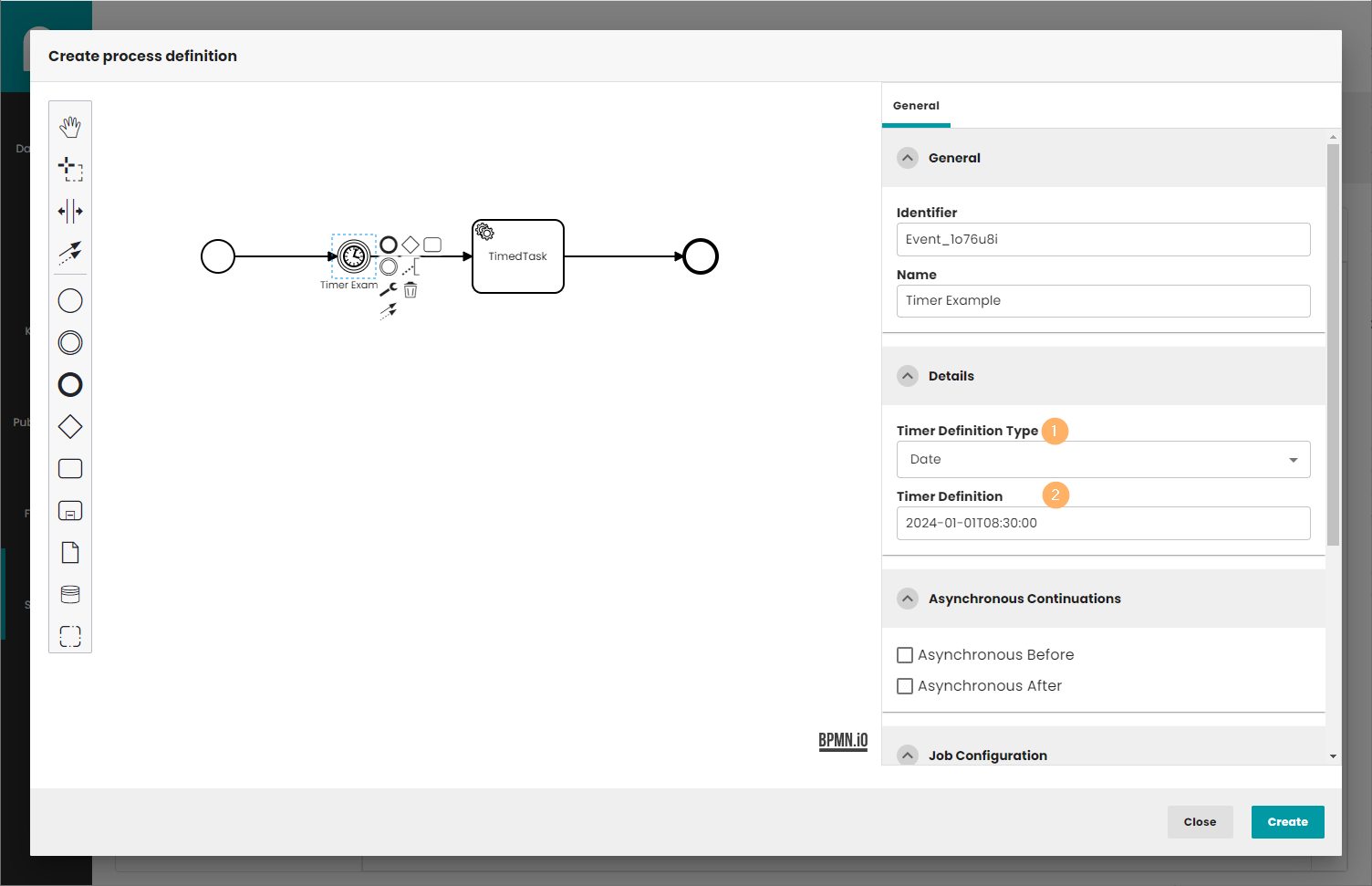
Timers, exactly Timer Intermediate Catch Events, are "Intermediate/Boundary Events", displayed as double lined circles with a clock inside.
You must fill in two things:
- Timer Definition Type: Date, duration or cycle.
- Timer Definition Value: For type Date the date when the execution shall go on. Example for the format needed is 2023-06-21T16:45:00. For duration the duration until the execution goes on. For cycle specifies repeating intervals, which can be useful for starting process periodically, or for sending multiple reminders for overdue user tasks. See Camunda documentation for the details.
11 Call activity
BPMN 2.0 distinguishes between an embedded subprocess and a call activity. Conceptually, both initiate a subprocess when the process execution reaches the activity.
The key difference is that a call activity references a process external to the current process definition, whereas an embedded subprocess is part of the original process definition. The primary use case for a call activity is to have a reusable process definition that multiple other processes can invoke. Though not yet part of the BPMN specification, a CMMN case definition can also be called.
When execution reaches a call activity, a new process instance is created to run the subprocess, potentially creating parallel child executions similar to a regular process. The main process instance waits for the subprocess to complete before continuing.
A call activity is a regular activity requiring a calledElement, which references a process definition by its key. In practice, this means the process id is used in the calledElement.
It's important to note that the subprocess's process definition is resolved at runtime, allowing the subprocess to be deployed independently from the calling process if necessary.
11.1 Call element
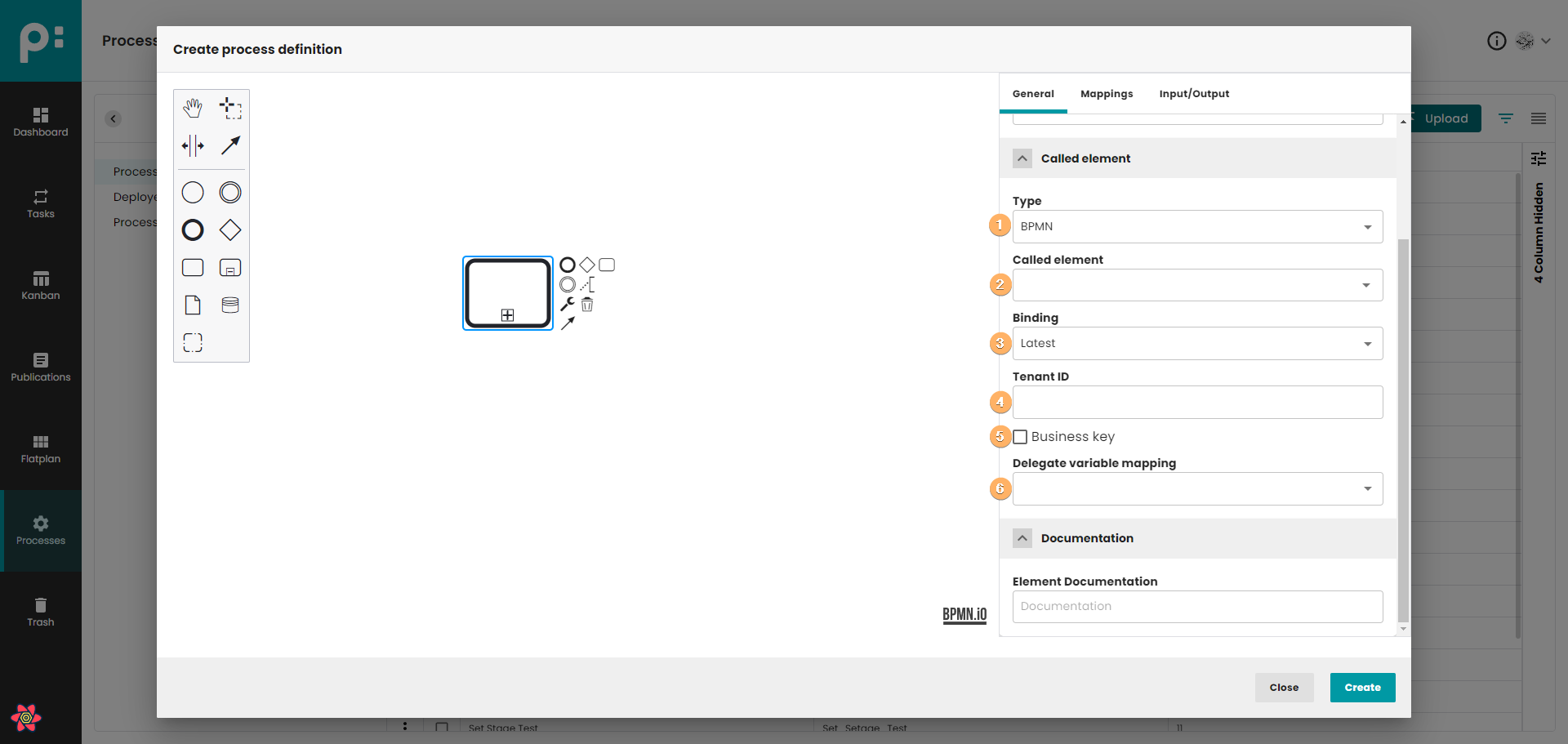
- In this field you can select one of 3 definition types:
- "None": No definition selected.
- "BPMN": BPMN type definition.
- "CMMN": CMMN type definition.
- Process definition by its key. You can enter the key manually or select an existing one.
- Depending on which option is selected in point 1, there are two binding options: Called element binding has four possible values:
- latest: Always invoke the most recent process definition version (this is the default behavior if the attribute is not specified).
- deployment: If the called process definition is part of the same deployment as the calling process definition, use the version from that deployment.
- version: Invoke a specific version of the process definition, requiring the calledElementVersion attribute. The version number can be specified in the BPMN XML or determined by an expression (see custom extensions).
- versionTag: Invoke a specific version tag of the process definition, requiring the calledElementVersionTag attribute. The version tag can be specified in the BPMN XML or determined by an expression.
Case binding has three possible values:
- latest: Always call the most recent case definition version (this is the default behavior if the attribute is not defined).
- deployment: If the called case definition is part of the same deployment as the calling process definition, use the version from that deployment.
- version: Call a specific version of the case definition; in this case, the caseVersion attribute is required.
- An expression also allows using the tenant id of the calling process instance instead of the calling process definition.
- Business key which will be passed to the subprocess.
- In this field you can select one of 3 delegate variable mapping:
- "None": No delegate variable selected.
- "Class": Class that delegates the input and output variable mapping for a call activity.
- "Delegate expression": Delegate expression that delegates the input and output variable mapping for a call activity.
11.2 Mappings
You can transfer process variables between the main process and the subprocess. The data is copied into the subprocess when it starts and is copied back into the main process when the subprocess concludes.
11.2.1 Passing In/Out mapping propagation
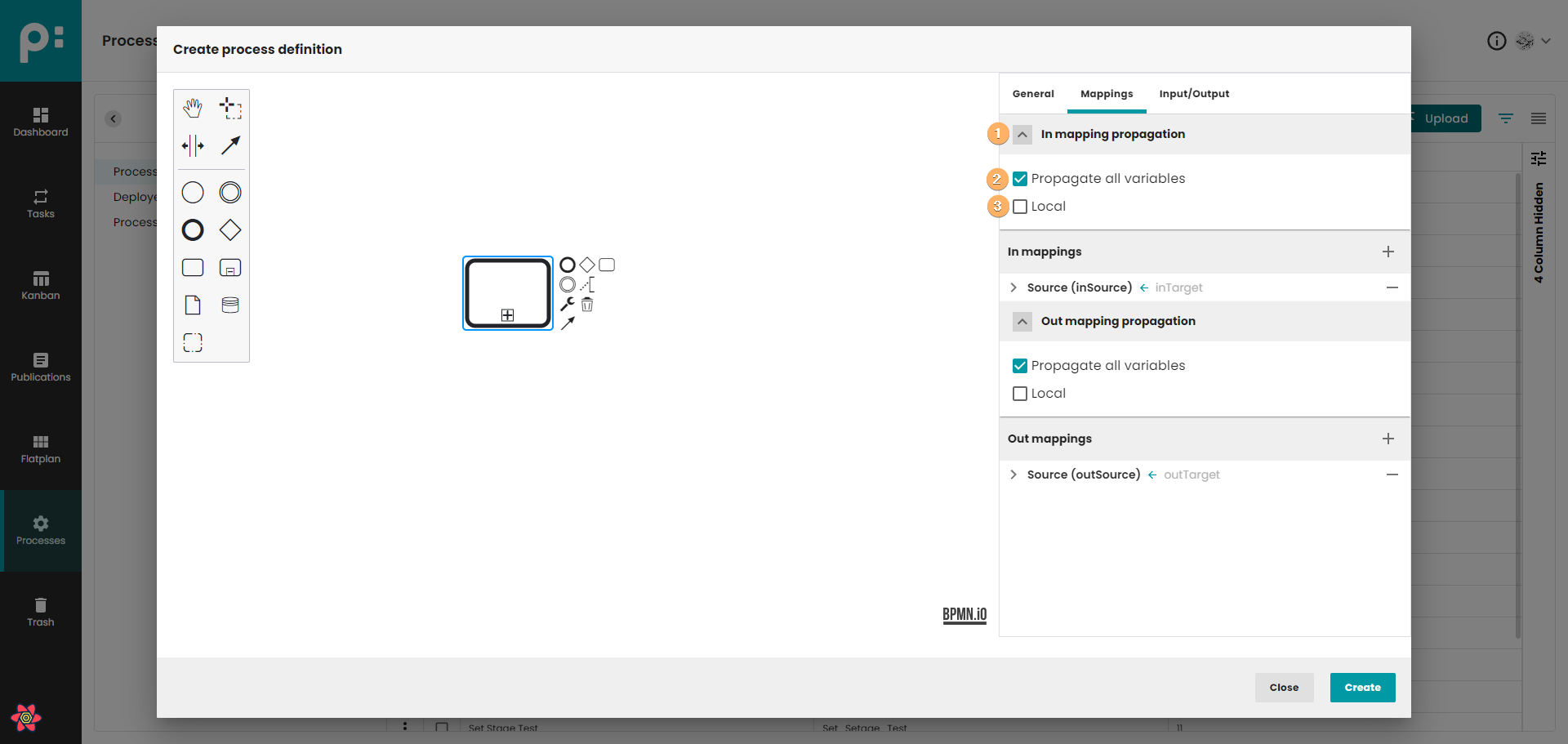
- The accordion component allows showing and hiding sections of related content on a page.
- You can pass process variables to the subprocess and vice versa. The data is copied into the subprocess when it is started (In) and copied back into the main process when it ends (Out).
- In order to only map variables that are declared in the inputOutput mapping, the attribute local can be used. Setting local means that all local variables of the execution executing the call activity are mapped into the called process instance.
11.2.2 Passing In/Out mappings
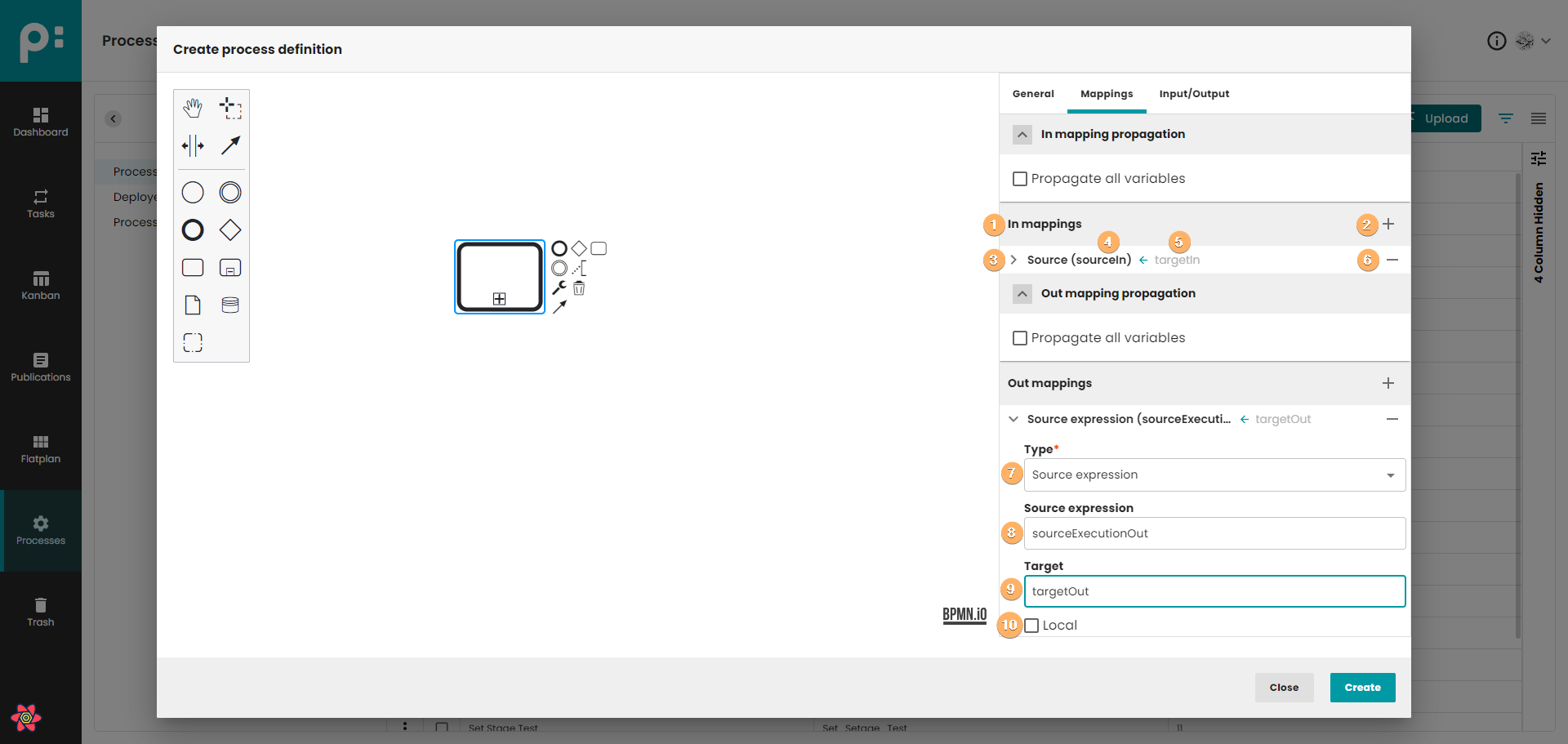
- Panel with In/Out mappings.
- Button for adding a new In/Out mapping.
- The arrow that shows/hides parameter details. After unfolding the details, editing is possible.
- Source name.
- Target name.
- Button for removing mapping from list.
- A variable that specifies the type of the mapping. We can distinguish 2 types of parameters (Source Or Source expression).
- Source/Source expression name.
- Target name.
- Local parameter.
11.3 Input/Output
Input/Output works in the same way as presented in the user task (5.3)
11.4 Multi instance
Multi instance is described in 9.2.
12 Other elements
The modeler allows you to use many other elements in the creating process of the diagram. The objects described above, and their properties, are officially supported by our application. The remaining elements will be used and made by Camunda server, but they are not recommended for use.
Therefore, in the case of these elements, we only show basic information about these objects (identifier and name).
13 External documentation
Information about good practices that should be kept in mind when creating your diagrams can be found in:
More information about BPMN 2.0 you can find in: