AuthService Configuration
Overview
Authentication in the publishing server can work in two ways. Users can sign in through an external identity provider using OpenID Connect, or they can sign in as local users without any realm information. Both paths go through the AuthService, so every application must be registered in the apps section to let the AuthService launch it and start a session.
This article uses basic terms from OpenID Connect. When an external identity provider is used, a user who is already authenticated in the browser can open priint:suite without entering a password again. All sensitive information stays with the external identity provider. For a general introduction to OpenID Connect please consult further documentation.
1. Payara Server Configuration
The AuthService is enabled by default, it requires both a dedicated configuration file and specific Payara properties. In the Payara administration console open the server entry in the left menu, then open the Properties tab. Two properties are added by default:
pubserverLoginUriwith value:/auth/loginpubserverLogoutUriwith value:/auth/api/logout
2. Configuration File
Configuration file is placed in a sub-folder in the domain folder: [path_to_your_domain_folder]/config/AuthService
with the name of config.xml.
Example file containing a full example configuration for multiple applications and realms, please adjust it for your project needs:
<authService>
<apps>
<app name="priint:planner" id="priintsuite" visible="true">
<uri>/PriintSuite/PriintSuite.html?db={project}&locale={locale}</uri>
</app>
<app name="priint:neowise" id="neowise" visible="true" default="true">
<uri>/Neowise/</uri>
</app>
<app name="priint:comet" id="comet" visible="false">
<uri>http://localhost:{referrerPort}/accept?server={requestURI}&login={userName}&project={project}&language={locale}&sessionId={sessionId}</uri>
</app>
<app name="priint:admin" id="admin" visible="true">
<uri>/Admin</uri>
<sessionCookieName>adminSessionId</sessionCookieName>
</app>
<app name="priint:w2p" id="w2p" visible="true">
<uri>http://localhost:{referrerPort}/w2p/auth/callback?sessionId={sessionId}</uri>
<sessionCookieName>w2pSessionId</sessionCookieName>
</app>
<app name="priint:data-management" id="data-management" visible="true">
<uri>http://localhost:{referrerPort}/dm/auth/callback?sessionId={sessionId}</uri>
<sessionCookieName>dataManagementSessionId</sessionCookieName>
</app>
</apps>
<callback>https://server_address:server_port/auth/callback</callback>
<realms>
<realm name="gitlab">
<type>org.pac4j.oidc.config.OidcConfiguration</type>
<discoveryURI>https://gitlab.com/.well-known/openid-configuration</discoveryURI>
<clientId>your_client_id_here</clientId>
<secret>your_secret_here</secret>
<membershipAttribute>groups_direct</membershipAttribute>
<membershipMapping>priint-dev:All Rights</membershipMapping>
<defaultDataset>DefaultProject</defaultDataset>
<membershipTeamsMapping>priint-dev:TestTeam</membershipTeamsMapping>
<defaultTeam>TestTeam</defaultTeam>
</realm>
<realm name="azure-ad-priint">
<type>org.pac4j.oidc.config.OidcConfiguration</type>
<discoveryURI>
https://login.microsoftonline.com/b6228f6f-4d3d-49c4-8d68-3c1b1705f9b6/v2.0/.well-known/openid-configuration
</discoveryURI>
<clientId>your_client_id_here</clientId>
<secret>your_secret_here</secret>
<useNonce>false</useNonce>
<usernameAttribute>preferred_username</usernameAttribute>
<emailAttribute>preferred_username</emailAttribute>
<displayNameAttribute>name</displayNameAttribute>
<membershipAttribute>wids</membershipAttribute>
<membershipMapping>
88d8e3e3-8f55-4a1e-953a-9b9898b8876b:Admin,b79fbf4d-3ef9-4689-8143-76b194e85509:Designer
</membershipMapping>
<defaultDataset>DefaultProject</defaultDataset>
</realm>
<realm name="Google">
<type>org.pac4j.oidc.config.OidcConfiguration</type>
<discoveryURI>https://accounts.google.com/.well-known/openid-configuration</discoveryURI>
<clientId>your_client_id_here</clientId>
<secret>your_secret_here</secret>
<useNonce>false</useNonce>
<defaultRole>All Rights</defaultRole>
<defaultDataset>DefaultProject</defaultDataset>
</realm>
<realm name="Keycloak">
<type>org.pac4j.oidc.config.OidcConfiguration</type>
<discoveryURI>https://url-to-keycloak.com/.well-known/openid-configuration</discoveryURI>
<clientId>your_client_id_here</clientId>
<secret>your_secret_here</secret>
<useNonce>false</useNonce>
<clientAuthenticationMethod>client_secret_post</clientAuthenticationMethod>
<defaultDataset>aio</defaultDataset>
<mappingRules>
<rule>
<conditions>
<condition attribute="email" match="*@priint.com"/>
</conditions>
<actions>
<action type="assignProject" value="aio"/>
<!-- we should support to use the matched group for the action value -->
</actions>
</rule>
<!-- 4) Wildcard email match -->
<rule>
<conditions>
<condition attribute="email" match="*@priint.com"/>
<!-- we should support wildcard for the condition check -->
</conditions>
<actions>
<action type="assignRole" value="Admin"/>
<!-- we should support to use attribute value as action value -->
</actions>
</rule>
<rule>
<conditions>
<condition attribute="email" match="*@priint.com"/>
<!-- we should support wildcard for the condition check -->
</conditions>
<actions>
<action type="assignTeam" value="QC"/>
</actions>
</rule>
<rule>
<conditions>
<condition attribute="groups" match="*developer"/>
<condition attribute="groups" match="*pm"/>
<!-- we should support attribute value for the condition check -->
<!-- only need one condition passes, the action will be done -->
</conditions>
<actions>
<action type="assignTeam" value="DEV"/>
</actions>
</rule>
<rule>
<conditions>
<condition attribute="groups" match="*po"/>
<condition attribute="groups" match="*pm"/>
</conditions>
<actions>
<action type="assignTeam" value="PO_PM"/>
</actions>
</rule>
<rule>
<conditions>
<condition attribute="country" match="DE"/>
</conditions>
<actions>
<action type="setUiLanguage" value="deu"/>
<action type="setDataContext" value="deu_DE"/>
</actions>
</rule>
<rule>
<conditions>
<!-- Condition #1: pubserver-<team> -->
<condition attribute="groups" match="^(pubserver)-([A-Za-z0-9_-]+)$"/>
<!-- Condition #2: 'developer' -->
<condition attribute="groups" match="*dev*"/>
</conditions>
<actions>
<!-- CASE index: use {$1.1} → "test" -->
<action type="assignTeam" value="{$1.2}"/>
<!-- CASE attribute: {groups} → "pubserver-test-group" (from condition #2) -->
<action type="assignTeam" value="{groups}"/>
<!-- CASE match: {match_1} → "developer" (because condition #2 after) -->
<action type="assignTeam" value="{$1.0}"/>
</actions>
</rule>
</mappingRules>
</realm>
</realms>
</authService>
Applications
In applications part (apps) we can configure the name attribute of the app tag. Optionally we can add
sessionCookieName node. Default sessionCookieName is Constants.PUBSERVER_SESSSION_NAME, it is defined in
PubserverSDK. Note: Name of a cookie set in sessionCookieName node, has to be supported by the application you
configure it for.
Additionally, you can configure default attribute, if set to true that means this will be default application in the
combo box with applications list, but only when the URL parameter app is empty.
Callback
We provide a default callback tag - this is the URL to reach publishing server authentication from any of the OpenIDConnect
provider. Do not forget to put your server address and port there, otherwise your identity provider won't be able to find the publishing server!
Realms
In realms section we can configure realms for log-in using external identity service - realms section is optional.
Create a realm node for every external identity provider you need in the configuration file as shown in the previous
example. The name attribute of the realm is used to label the login button in the login screen. Please do not use
spaces inside the name.
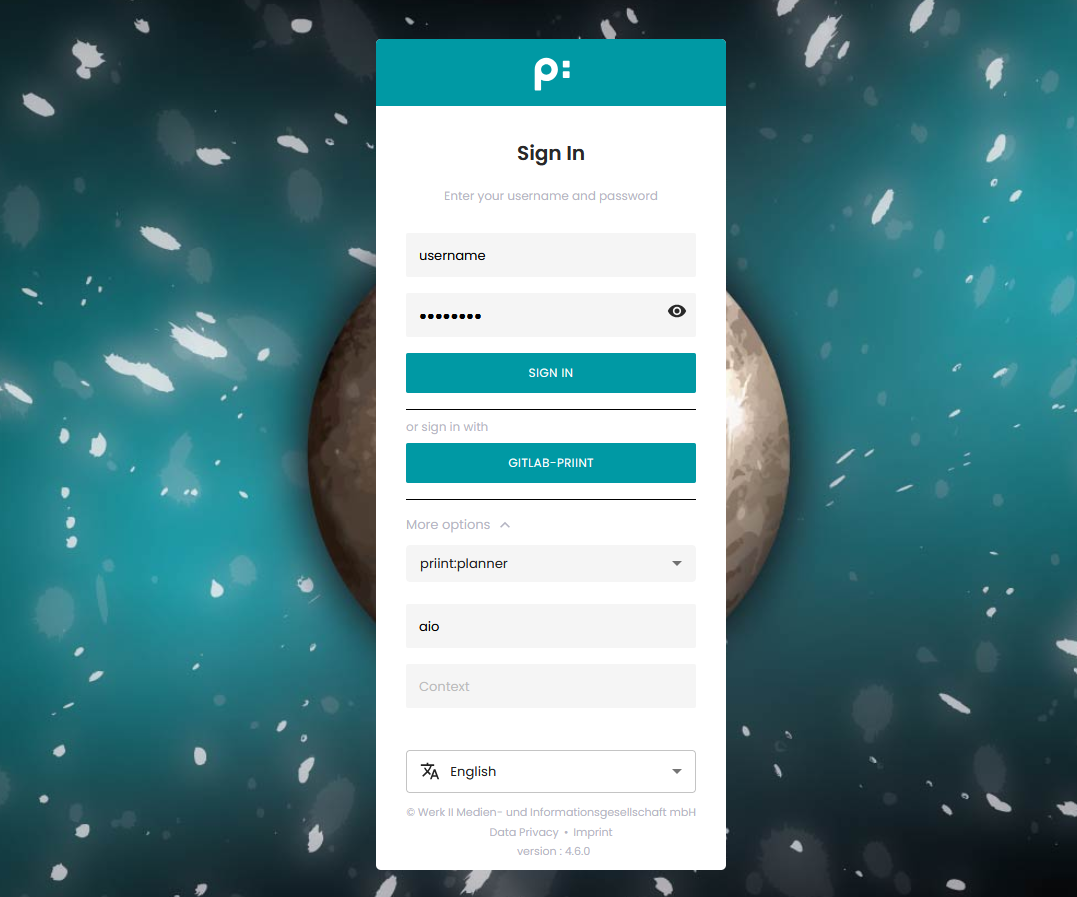 Example: Screenshot shows the login with Gitlab as Identity Provider
The element realm can have the following elements, some required and some optional.
| Element | Req/Opt | Description |
| type | Required | As of now, must be set to org.pac4j.oidc.config.OidcConfiguration. Currently
we don't support other types. |
| discoveryURI | Required | The value must contain the valid URL that exposes metadata for the Open ID connect for the external identity provider. |
| clientID | Required | Received from external identity provider. |
| secret | Required | Received from external identity provider. |
| displayNameAttribute | Optional | Where to read the displayName from that is shown as "name" in the list of users in priint:suite administration. |
| emailAttribute | Optional | From which claim to read the email address for the user account. |
| firstnameAttribute | Optional | From which claim to read the first name for the user account. |
| lastnameAttribute | Optional | From which claim to read the last name for the user account. |
| usernameAttribute | Optional | From which claim to read the username that is used as "login" in the list of users in priint:suite administration. |
| defaultDataset | Optional | If a new user is created on first login this is the default dataset (i.e.CometProject) that the user will be assigned to. The user can only login into publishing planner if a dataset is assigned. The dataset should be the identifier (not the name) of your comet project, as can be seen in ison. |
| membershipAttribute | Optional/Required | From which claim to read the memberships that map to roles in publishing server. The role mapping itself is specified via the membershipMapping property. The element is not needed if you configure a <defaultRole/> instead. |
| defaultRole | Optional | If a new user is created on first login this is the default role in Pubserver it is assigned to. Further roles can be assigned by publishing planner UI. This can be overruled by setting membershipMappings. |
| defaultTeam | Optional | Set a default workflow team for the user. This can be overruled by setting membershipTeamsMapping. |
| membershipMapping | Optional | Comma separated string with directoryGroup:pubserverRole pairs defining a mapping between membership groups as read from membershipAttribute and publishing server roles. Alternatively a simple group name prefix can be defined. This is only used if membershipFunction is also set.This overrules the defaultRole setting. |
| membershipTeamsMapping | Optional | Comma separated string with OAuthGroup:pubserverTeam pairs defining a mapping between OAuth server groups and publishing server workflow teams. Syntax: [OAuth-Group1]:[Team1]:[Team2],[OAuth-Group2]:[Team3] This overrules the defaultTeam setting. |
| mappingRules | Optional | Dynamic Mapping Rules let you read claims from an OIDC identity provider and convert them into internal attributes like roles, projects, teams, UI language, and data context by evaluating flexible match conditions and applying the configured actions in each rule. Find out more here |
Dynamic Mapping Rules
With any OIDC external users, we can use dynamic mapping rules to automatically assign projects, teams, and roles when
they log in to PubServer. These dynamic mapping rules only apply when certain conditions are met, so they will override global defaults set in other parts of the configuration.
For more details, see dynamic mapping rules.
Example Configurations
Find out more about the configuration for specific OIDC identity providers here. Please note that any OIDC compatible identity provider should be usable and that we don't provide example configuration for each possible provider.
Default UI Language
Although this configuration is not strictly related to the AuthService configuration, when we run AuthService for the
first time evaluate and set a default UI (user interface) language. To do so you have to add defaultLanguage node in
Neowise/{tenant}/custom/ApplicationConfig.xml.
Example:
<cfg:defaultLanguage>fr</cfg:defaultLanguage>
Available values are: de, fr, en, ja, if none of these values is set the fallback language is English.