TABLE_SELECTION Step
Overview
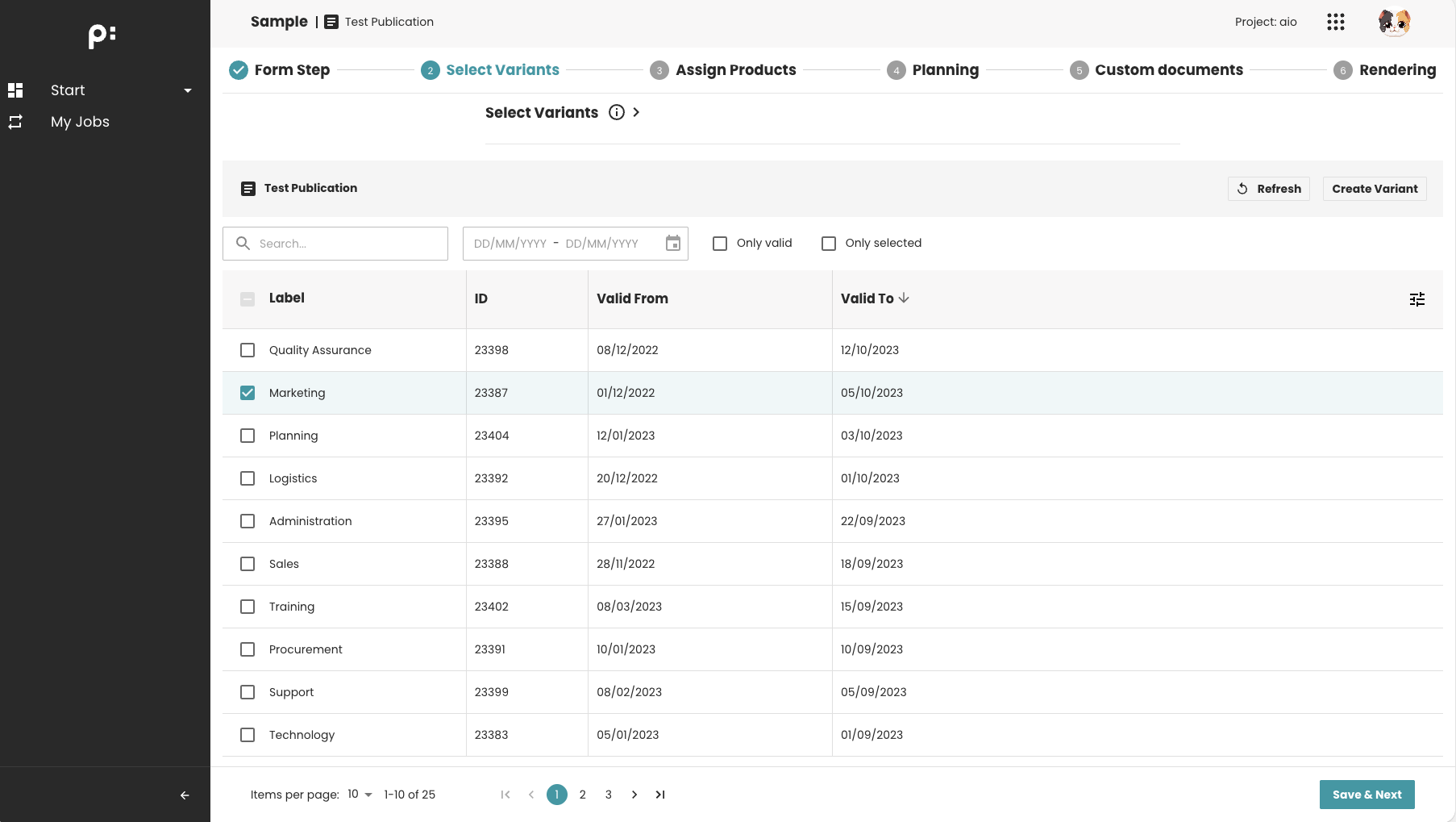
The TABLE_SELECTION step displays a configurable table that allows users to view, filter, and select rows from a dataset.
It is typically used when the wizard requires the user to choose items such as:
- Data records
- Variants
- Mapping entries
The step reads data from a backend source and presents it in a structured, sortable table UI.
Key Features
- Displays a table of data fetched from the backend
- Supports row selection (single or multiple)
- Allows sorting, filtering, and searching
- Supports mandatory selection when
required=true - Saves selected row data to the publication when proceeding
- Table columns are fully configurable
- Supports icon button to reload the table data
- Supports add custom buttons in the table definition
Behavior Summary
Data Loading
When entering the step:
- The frontend requests data for the table
- Columns are displayed based on predefined configuration
- Existing selections (if any) are restored
Row Selection Behavior
- Users can click to select one or multiple rows
- If the step is required:
- At least one row must be selected to proceed
Saving Behavior
- On Next, selected row data are submitted to the backend
- If saving fails, the user stays on the step and an error is shown
Sample Configuration
<wizardSteps>
  <wizardStep id="variants_selection">
    <label>Select Variants</label>
    <type>TABLE_SELECTION</type>
    <status>variants_selection_status</status>
    <required>true</required>
    <parameters>
      <!-- Defines which table to load -->
      <parameter id="table_id">variants_list</parameter>
    </parameters>
  </wizardStep>
</wizardSteps>

<tables>
    <table id="variants_list">
        ...
    </table>
</tables>
When to Use This Step
Use the TABLE_SELECTION step when you need to:
- Let the user choose items from a structured list
- Select multiple items to send to the next step
- Filter through large datasets
- Provide decision points based on table content
Common examples:
- Choosing attributes or variants
- Selecting data to map or configure
Notes
- The table definition must exist and match the configured
table_id. - If selection is mandatory (required=true), the wizard doesn't allow to go to the next step if no rows are selected.
- Sorting and filtering depend on the table definition.
- The saved data of the selected rows are controlled also by the table definition.