Configuration
Getting Started
Use our suggested sample configuration as a starting point and update it with your specific project configuration.
- ISON Plugin is used to manage application configurations.
- The mapped name of the
ISONfile is:com.priint.w2p.config.W2PConfiguration.
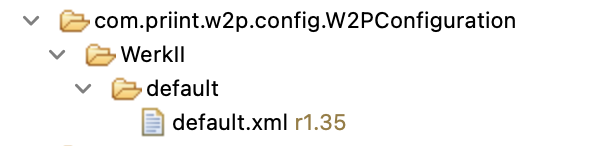
Sample ISON Configuration:
The sample configuration defines various elements for managing wizards, steps, forms, tables, methods, and other features of the Web2Publish application.
<?xml version="1.0" encoding="UTF-8" standalone="yes"?>
<con:PluginConfig xmlns:con="com.priint.pubserver.config.manager/20130620">
<con:name>default.xml</con:name>
<con:type>W2PConfiguration</con:type>
<con:dependencies/>
<con:custom>
<web2publish version="1.0">
<!-- holds a list of publication types -->
<publicationTypes>
<!-- defines individual publication types identified by an identifier. -->
<publicationType identifier="{PUB_TYPE_ID}">
<label>pub_type_label</label>
<!-- A list of wizard configurations used for this publication type. -->
<wizards>
<wizard>wizard_id</wizard>
</wizards>
</publicationType>
</publicationTypes>
<wizards>
<!-- defines each wizard -->
<wizard id="wizard_id">
<label>wizard_label</label>
<!-- Metadata related to the template. -->
<isTemplateMetadata>is_template_metadata</isTemplateMetadata>
<contentSelectionMetadata>content_selection_metadata</contentSelectionMetadata>
<isCompletedMetadata>is_completed_metadata</isCompletedMetadata>
<countryMetadata>country_cbx</countryMetadata>
<languageMetadata>language_cbx</languageMetadata>
<statusMetadata>catalog_metadata</statusMetadata>
<completedStatus>completed</completedStatus>
<!-- Specifies the steps of the wizard. -->
<steps>
<step>form_step</step>
<step>table_step</step>
<step>planning_step</step>
<step>custom_step</step>
<step>process_step</step>
</steps>
</wizard>
</wizards>
<!-- Defines the various steps within the wizard. -->
<wizardSteps>
<!-- Each step is identified by its id -->
<wizardStep id="form_step">
<!-- Type of the step (e.g., FORM, TABLE_SELECTION, PLANNING_TREE) -->
<type>FORM</type>
<label>form_step_label</label>
<status>form</status>
<!-- Parameters for the step, which can include various settings like fields or columns. -->
<parameters>
<parameter key="form_field" id="field_1"/>
<parameter key="form_field" id="field_2"/>
<parameter key="form_field" id="field_3"/>
<parameter key="form_field" id="field_4"/>
<parameter id="duplicate_post_process">duplicate_post_process</parameter>
</parameters>
</wizardStep>
<wizardStep id="table_step">
<type>TABLE_SELECTION</type>
<label>table_step_label</label>
<status>table</status>
<parameters>
<parameter id="table_id">table_1</parameter>
</parameters>
</wizardStep>
<wizardStep id="planning_step">
<type>PLANNING_TREE</type>
<label>planning_step_label</label>
<status>planning</status>
<parameters>
<parameter key="entity_column" id="planning_static_columns">planning_static_columns</parameter>
<parameter key="entity_column" id="planning_metadata_columns">planning_metadata_columns
</parameter>
</parameters>
</wizardStep>
<wizardStep id="custom_step">
<type>CUSTOM_DOCUMENTS</type>
<label>custom_step_label</label>
<status>custom</status>
<parameters>
<parameter id="content_metadata">custom_content_metadata</parameter>
<parameter id="process_def_key">custom_process</parameter>
</parameters>
</wizardStep>
<wizardStep id="process_step">
<type>PROCESS</type>
<label>process_step_label</label>
<status>process</status>
<parameters>
<parameter id="process_1" key="process_def_key">process_1</parameter>
<parameter id="process_2" key="process_def_key">process_2</parameter>
<parameter id="execute_label">process_execute</parameter>
<parameter id="retry_label">process_retry</parameter>
<parameter id="show_completed_tasks">true</parameter>
<parameter id="stoppable">true</parameter>
<parameter id="export">true</parameter>
<parameter id="preview">true</parameter>
<parameter id="preview_path">preview_path</parameter>
<parameter id="autorun">true</parameter>
</parameters>
</wizardStep>
</wizardSteps>
<!-- Defines the form fields used in wizards. -->
<formFields>
<!-- Each form field is defined by an id, label, and other attributes -->
<formField id="field_1">
<propertyAttribute>name</propertyAttribute>
<label>field_1_label</label>
<required>true</required>
</formField>
<formField id="field_2">
<!-- Metadata for the field. -->
<metadata>field_2_metadata</metadata>
<label>field_2_label</label>
<!-- Specifies if the field is mandatory. -->
<required>false</required>
<type>select</type>
<selection>selection_1</selection>
</formField>
<formField id="field_3">
<metadata>field_3_metadata</metadata>
<label>field_3_label</label>
<required>false</required>
<disabled>true</disabled>
</formField>
<formField id="field_4">
<metadata>field_4_metadata</metadata>
<label>field_4_label</label>
<type>select</type>
<!-- Method used for dynamic selection of options. -->
<selectionMethod>get_field_4_data</selectionMethod>
<required>true</required>
</formField>
</formFields>
<!-- Defines selection lists used in forms. -->
<selections>
<!-- A list of predefined options for selection fields. -->
<selection id="selection_1">
<option id="option_1">option_1_label</option>
<option id="option_2">option_2_label</option>
</selection>
</selections>
<!-- Defines tables used within the configuration. -->
<tables>
<!-- Each table is described with metadata, columns, and links. -->
<table id="table_id">
<metadata>table_metadata</metadata>
<method>get_table_data</method>
<label>table_label</label>
<description>table_desc</description>
<rowIdKey>row_id</rowIdKey>
<columns>
<column>
<key>column_id</key>
<label>column_id_label</label>
<property>id</property>
<type>NUMBER</type>
<needAsDefault>false</needAsDefault>
<metadata>table_metadata</metadata>
</column>
<column>
<key>column_text</key>
<label>column_text_label</label>
<required>true</required>
<entities>
<entity>column_text_entity</entity>
</entities>
</column>
<column>
<key>column_date_from</key>
<label>column_date_from_label</label>
<type>DATE</type>
<entities>
<entity>column_date_from_entity</entity>
</entities>
<metadata>table_date_from_metadata</metadata>
</column>
<column>
<key>column_date_to</key>
<label>column_date_to_label</label>
<type>DATE</type>
<entities>
<entity>column_date_to_entity</entity>
</entities>
<metadata>table_date_to_metadata</metadata>
</column>
<column>
<key>column_date_range</key>
<label>column_date_range_label</label>
<type>DATE_RANGE</type>
<entities>
<entity>column_date_from_entity</entity>
<entity>column_date_to_entity</entity>
</entities>
<metadata>table_date_range_metadata</metadata>
</column>
<column>
<key>column_boolean</key>
<label>column_boolean_label</label>
<type>BOOLEAN</type>
<visible>false</visible>
<entities>
<entity>column_boolean_entity</entity>
</entities>
</column>
</columns>
<links>
<link>table_link</link>
</links>
<filters>
<filter>
<key>text_filter</key>
<columns>
<column>column_id</column>
<column>column_text</column>
</columns>
</filter>
<filter>
<key>date_range_filter</key>
<columns>
<column>column_date_range</column>
</columns>
<type>DATE_RANGE</type>
</filter>
<filter>
<key>boolean_filter</key>
<label>boolean_filter_label</label>
<columns>
<column>column_boolean</column>
</columns>
<type>BOOLEAN</type>
</filter>
</filters>
</table>
</tables>
<!-- Specifies methods used to dynamically fetch data for form fields or tables. -->
<methods>
<!-- Each method has an id, a mapped plugin name, and arguments required for the method. -->
<method id="get_field_4_data">
<pluginMappedName>plugin_mapped_name</pluginMappedName>
<methodName>getField4Data</methodName>
<arguments>
<argument key="Session.Id"><Session.Id></argument>
<argument key="Entity.Context"><Entity.Context></argument>
<argument key="Variable.name_1">value_1</argument>
<argument key="Variable.Metadata_1"><Metadata.metadata_1></argument>
</arguments>
</method>
<method id="get_table_data">
<pluginMappedName>plugin_mapped_name</pluginMappedName>
<methodName>getTableData</methodName>
<arguments>
<argument key="Session.Id"><Session.Id></argument>
<argument key="Entity.Context"><Entity.Context></argument>
<argument key="Variable.name_1">value_1</argument>
<argument key="Variable.Metadata_1"><Metadata.metadata_1></argument>
</arguments>
</method>
</methods>
<!-- Defines static and metadata columns for entity data used in planning. -->
<entityColumns>
<!-- Each column is identified by a type and contains details like keys and default settings. -->
<entityColumn type="static" id="planning_static_columns">
<columns>
<column>
<key>label</key>
<required>true</required>
<needAsDefault>true</needAsDefault>
</column>
<column>
<key>identifier</key>
<required>false</required>
<needAsDefault>true</needAsDefault>
</column>
<column>
<key>createdOn</key>
<required>false</required>
<needAsDefault>false</needAsDefault>
</column>
<column>
<key>createdBy</key>
<required>false</required>
<needAsDefault>false</needAsDefault>
</column>
<column>
<key>updatedOn</key>
<required>false</required>
<needAsDefault>false</needAsDefault>
</column>
<column>
<key>updatedBy</key>
<required>false</required>
<needAsDefault>false</needAsDefault>
</column>
</columns>
</entityColumn>
<entityColumn type="metadata" id="planning_metadata_columns">
<columns>
<column>
<key>content_metadata_key_1</key>
<required>1</required>
<needAsDefault>1</needAsDefault>
</column>
</columns>
</entityColumn>
</entityColumns>
<!-- Describes entities used in the configuration. -->
<entities>
<!-- Each entity is identified by its id and contains a name and type. -->
<entity id="column_text_entity">
<name>text_entity</name>
<type>TEXT</type>
</entity>
<entity id="column_date_from_entity">
<name>date_from_entity</name>
<type>text</type>
</entity>
<entity id="column_date_to_entity">
<name>date_from_entity</name>
<type>text</type>
</entity>
<entity id="column_boolean_entity">
<name>boolean_entity</name>
<type>text</type>
</entity>
</entities>
<!-- Defines links to external resources or pages. -->
<links>
<!-- Contains the URL, target behavior (e.g., open in a new tab), and a label. -->
<link id="table_link">
<url>url</url>
<target>[NEW_TAB|IFRAME]</target>
<label>link_label</label>
</link>
</links>
<!-- Configuration for displaying news on the Web2Publish home page. -->
<newsList>
<!-- Each news item is linked to a bucketId and entityId with keys for filtering news data -->
<news bucketId="{BUCKET_ID}" entityId="{BUCKET_ENTITY_ID}">
<keys>
<key resultEntityId="{NEW_ENTITY_ID}">new_key</key>
</keys>
</news>
</newsList>
<myJob>
<visible>true</visible>
<processDefKeys>
</processDefKeys>
</myJob>
<documentFilter>
<whiteListing>
<arguments>
<argument key="language_cbx">ALL</argument>
</arguments>
</whiteListing>
<blackListing>
<arguments>
<argument key="w2p_ContentSelection">false</argument>
</arguments>
</blackListing>
</documentFilter>
<!-- Specifies the processes used in the wizard steps. -->
<processes>
<!-- Each process could be has label, description, executing message and arguments (variables). -->
<process key="process_1">
<label>process_1_label</label>
<description>process_1_description</description>
<executingMessage>executing_message_process_1</executingMessage>
<arguments>
<argument key="templateId"><Template.Id></argument>
<argument key="publicationId"><Publication.Id></argument>
<argument key="booleanArgument" type="CHECK_BOX">true</argument>
<argument key="textArgument">text_argument</argument>
</arguments>
</process>
</processes>
<!-- Defines language-specific translations for the labels. -->
<translations>
<!-- Key-value pairs for language-specific content. -->
<translation key="pub_type_label" lang="en">Publication Type</translation>
<translation key="pub_type_label" lang="de">Publication Type</translation>
<translation key="wizard_label" lang="en">Wizard</translation>
<translation key="wizard_label" lang="de">Wizard</translation>
<translation key="form_step_label" lang="en">Form Step</translation>
<translation key="form_step_label" lang="de">Form Step</translation>
<translation key="table_step_label" lang="en">Table Step</translation>
<translation key="table_step_label" lang="de">Table Step</translation>
<translation key="planning_step_label" lang="en">Planning Step</translation>
<translation key="planning_step_label" lang="de">Planning Step</translation>
<translation key="custom_step_label" lang="en">Custom Step</translation>
<translation key="custom_step_label" lang="de">Custom Step</translation>
<translation key="process_step_label" lang="en">Process Step</translation>
<translation key="process_step_label" lang="de">Process Step</translation>
<translation key="process_execute" lang="en">Execute</translation>
<translation key="process_execute" lang="de">Execute</translation>
<translation key="process_retry" lang="en">Retry</translation>
<translation key="process_retry" lang="de">Retry</translation>
<translation key="field_1_label" lang="en">Field 1</translation>
<translation key="field_1_label" lang="de">Field 1</translation>
<translation key="field_2_label" lang="en">Field 2</translation>
<translation key="field_2_label" lang="de">Field 2</translation>
<translation key="field_3_label" lang="en">Field 3</translation>
<translation key="field_3_label" lang="de">Field 3</translation>
<translation key="field_4_label" lang="en">Field 4</translation>
<translation key="field_4_label" lang="de">Field 4</translation>
<translation key="option_1_label" lang="en">Option 1</translation>
<translation key="option_1_label" lang="de">Option 1</translation>
<translation key="option_2_label" lang="en">Option 2</translation>
<translation key="option_2_label" lang="de">Option 2</translation>
<translation key="table_label" lang="en">Table Label</translation>
<translation key="table_label" lang="de">Table Label</translation>
<translation key="table_desc" lang="en">Table Description</translation>
<translation key="table_desc" lang="de">Table Description</translation>
<translation key="column_id_label" lang="en">ID</translation>
<translation key="column_id_label" lang="de">ID</translation>
<translation key="column_text_label" lang="en">Text</translation>
<translation key="column_text_label" lang="de">Text</translation>
<translation key="link_label" lang="en">Link</translation>
<translation key="link_label" lang="de">Link</translation>
</translations>
</web2publish>
</con:custom>
</con:PluginConfig>
Root Element: <web2publish>
This is the parent element that encapsulates the configuration for Web2Publish.
publicationTypes:
<publicationTypes>holds a list of publication types.<publicationType>defines individual publication types identified by an identifier.<label>: Describes the publication type.<wizards>: A list of wizard configurations used for this publication type.
wizards:
<wizard>defines each wizard by its id and includes:<label>: Descriptive label of the wizard.<isTemplateMetadata>: Metadata related to the template.<isCompletedMetadata>: Metadata related to the finish status of the publication<countryMetadata>: Metadata of country<languageMetadata>: Metadata of language<steps>: Specifies the steps of the wizard.
wizardSteps:
Defines the various steps within the wizard.
<wizardStep>: Each step is identified by its id and contains:<type>: Type of the step (e.g., FORM, TABLE_SELECTION, PLANNING_TREE).<parameters>: Parameters for the step, which can include various settings like fields or columns.
formFields:
Defines the form fields used in wizards.
<formField>: Each form field is defined by an id, label, and other attributes like:<metadata>: Metadata for the field.<required>: Specifies if the field is mandatory.<selectionMethod>: Method used for dynamic selection of options.
selections:
Defines selection lists used in forms.
<selection>: A list of predefined options for selection fields.
tables:
Defines tables used within the configuration.
<table>: Each table is described with metadata, columns, and links.
methods:
Specifies methods used to dynamically fetch data for form fields or tables.
<method>: Each method has an id, a mapped plugin name, and arguments required for the method.
entityColumns:
Defines static and metadata columns for entity data used in planning.
<entityColumn>: Each column is identified by a type and contains details like keys and default settings.
entities:
Describes entities used in the configuration.
<entity>: Each entity is identified by its id and contains a name and type.
links:
Defines links to external resources or pages.
<link>: Contains the URL, target behavior (e.g., open in a new tab), and a label.
newsList:
Configuration for displaying news on the Web2Publish home page.
<news>: Each news item is linked to abucketIdandentityIdwith keys for filtering news data.
myJob:
Configuration for displaying at my job page.
<visible>: A flag to configure the show/ hide MyJob page on the UI<processDefKeys>: represent for one process definition key. If this list is empty, all the current process will be count at My job page.
documentFilter:
Configuration is used to show the list of documents at the Planning step.
processes:
Configuration is used to specific the processes information.
translations:
Defines language-specific translations for the labels.
<translation>: Key-value pairs for language-specific content.
Key Elements Breakdown
- Wizards and Steps: Wizards guide users through multiple steps, each defined by its ID and parameters. These steps might involve forms, tables, or custom documents.
- Forms and Fields: Form fields are defined by their metadata, and selection options can be dynamically fetched using a method or statically predefined.
- Methods: Methods are used to fetch dynamic data, passing arguments such as session information or metadata.
- Entities and Columns: The entity configuration defines the static and metadata columns for data handling in planning views.
- News and Translations: News items are configurable by entity, and translations support multilingual configurations for labels and other elements.
This configuration provides a flexible framework for managing various aspects of the Web2Publish system, from dynamic forms to custom steps in a wizard, while supporting multilingual setups.